
FAQ
20 common questions about running TikTok Shop ads (GMV Max 2026)
Answers to the 20 questions sellers ask most about TikTok Shop ads in Vietnam: GMV Max, target ROI, budget, ROI Protection, videos, LIVE, sale days, GMV Max Coupon and GMV Max Pro.
Author: AVO Agency · Last updated: 7 October 2026 · Scope: TikTok Shop Vietnam
Quick summary: the numbers to remember when running ads
| Item | Figure (as of October 2026) | Source |
|---|---|---|
| TikTok Shop ad campaign type | GMV Max is the default and only supported type since July 2025 | TikTok Business Help Center |
| VAT on ad spend | 10% on the total top-up amount, from 1 July 2025 | TikTok Business Help Center |
| Lower transaction fee through GMV Max | From 6% down to 5% when GMV Max spend reaches 4% of GMV over 30 days | TikTok Shop Seller Academy |
| How Product GMV Max attributes orders | Every order (paid and organic) of the products in the campaign; 1-day window | TikTok Business Help Center |
| Keep the target ROI unchanged | At least 3 full days before changing it | TikTok Business Help Center |
| Recommended budget | 2 × non-LIVE GMV ÷ target ROI | TikTok Business Help Center |
| ROI Protection conditions | Actual ROI below 90% of target and more than 20 orders/day | TikTok Business Help Center |
| What a new video needs before the system has explored it | 3 days or 1,000 paid impressions | TikTok GMV Max guide |
| Auto Budget Increase | +50% each time, up to 10 times/day, when ROI reaches ≥ 90% and ≥ 80% has been spent | TikTok GMV Max guide |
| Promotion Day | Lowers ROI by 10% and raises budget by 50% by default | TikTok GMV Max guide |
| GMV Max Coupon fee | 3% of the campaign’s net revenue by default (1–50% allowed) | TikTok GMV Max guide |
This page brings together the 20 questions AVO hears most from sellers who run, or are about to run, TikTok Shop ads in Vietnam. The figures come from two groups of sources: the TikTok Business Help Center (TikTok’s public help pages) and the GMV Max and GMV Max Pro guides TikTok gives its partners. Every answer lists its sources at the end. The key figures were checked again against TikTok’s help pages on 7 October 2026.
Key points to remember
- GMV Max is mandatory: since July 2025, GMV Max has been the default and only supported campaign type for TikTok Shop ads (question 1).
- GMV Max ROI includes organic orders: every order of the products in the campaign counts, even orders from shoppers who never saw an ad, so this ROI cannot be compared with the old ROAS (question 5).
- The real cost is higher than the number shown: ad spend carries an extra 10% VAT at top-up, which pushes the break-even ROI in our example from 2.74 to 3.01 (question 4).
- ROI Protection has conditions: it only applies when actual ROI is below 90% of target and the campaign has more than 20 orders/day; for Product GMV Max, changing the ROI by hand even once loses protection for that day (question 9).
- No spend is usually an ROI or video problem: raising the budget will not fix it; check the videos first, then lower the ROI by less than 10% at a time (question 8).
- Turn on Promotion Day for sale days: the system lowers ROI by 10% and raises budget by 50% while keeping ROI Protection, unlike manual changes (question 17).
This page contains three kinds of information, and each deserves a different level of trust:
- Platform mechanics: taken from TikTok documents, with sources.
- Field experience: observations from practitioners, including a TikTok Shop workshop on 11 September 2026. These are not TikTok rules, and results can differ between accounts.
- AVO’s view: how we operate and the calculations we built ourselves.
Many GMV Max features are being rolled out account by account. If you cannot find a button mentioned here, your account most likely does not have that feature yet.
Contents
- Part 1. Before you start (questions 1–4)
- Part 2. ROI and budget (questions 5–10)
- Part 3. Videos for ads (questions 11–14)
- Part 4. LIVE GMV Max (questions 15–16)
- Part 5. Sale days, coupons and measurement (questions 17–20)
Part 1. Before you start
1. What types of TikTok Shop ads are there now? Do I have to use GMV Max?
Short answer: Yes, GMV Max is practically mandatory. According to TikTok, since July 2025 GMV Max has been the default and only supported campaign type for TikTok Shop ads. It comes in two forms: Product GMV Max advertises products through videos, and LIVE GMV Max advertises LIVE sessions. The old formats (VSA, PSA, LSA) can no longer be created, edited or duplicated, apart from a few narrow exceptions.
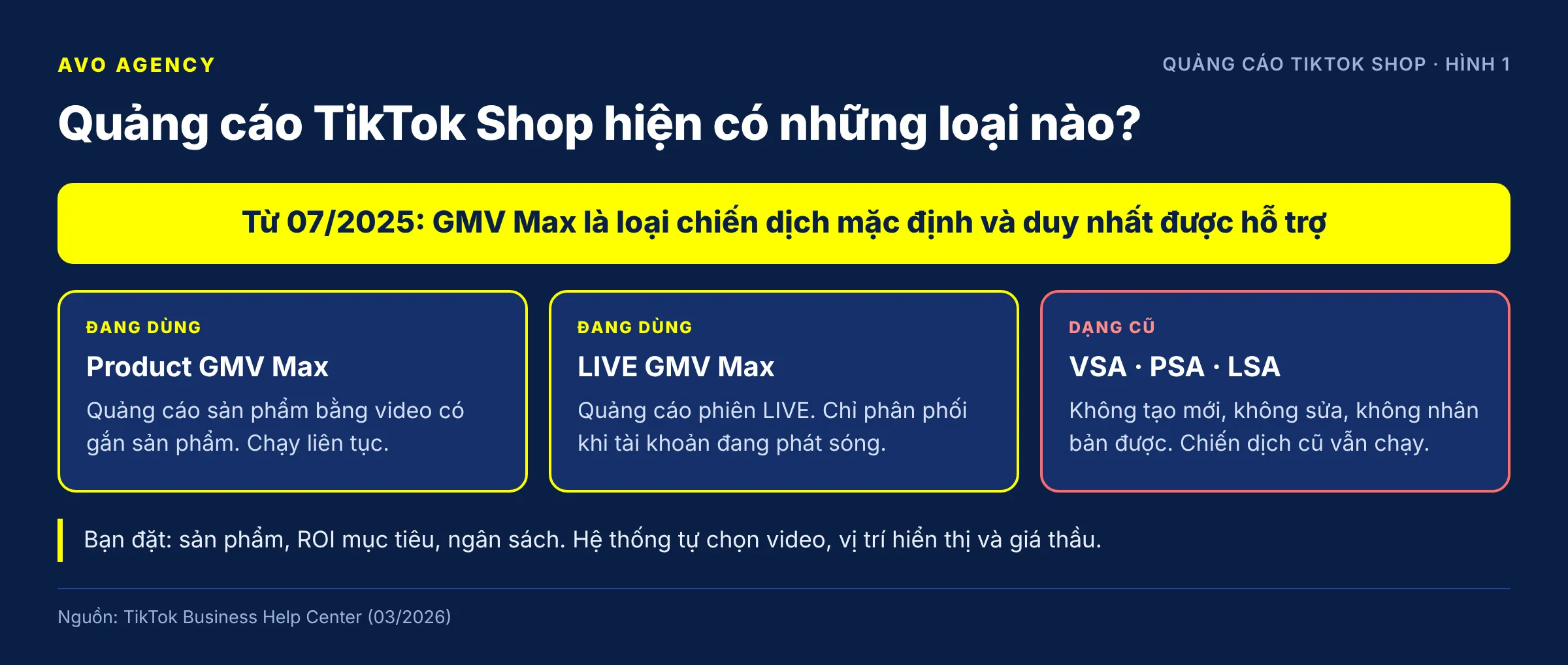
Figure 1: The two GMV Max formats in use and the old ad formats that can no longer be created.
| Product GMV Max | LIVE GMV Max | |
|---|---|---|
| Advertises | Products, through videos with product links | The LIVE session of one TikTok account |
| When it delivers | Continuously | Only while the account is LIVE |
| What you set | Products, target ROI, daily budget | LIVE account, target ROI, daily budget |
| What the system does | Picks videos, picks placements, sets bids | Picks the videos that lead into the LIVE, allocates budget |
What to know when moving to GMV Max:
- When a product joins a GMV Max campaign, any VSA/PSA ads running for that product are paused. If you choose to promote all products, all VSA/PSA ads are paused.
- Each product can only be in one GMV Max campaign at a time.
- TikTok lists two remaining exceptions: LIVE Shopping Ads can still be used with some TikTok accounts that are neither the official account nor a marketing account, and Video Shopping Ads can still run when the destination is Showcase.
- You cannot choose placements or audiences. The system decides those.
AVO’s view: Since you can no longer adjust audiences or placements, you control only four things: the product, the price and offers, the videos, and two numbers, target ROI and budget. Almost every question below comes back to these four.
Sources: TikTok Business Help Center – About GMV Max migration for TikTok Shop Ads (March 2026); TikTok Business Help Center – GMV Max guidelines (June 2026)
2. Which accounts and permissions do I need to run GMV Max?
Short answer: To run GMV Max you need three assets in the same Business Center (BC): the TikTok shop, the shop’s primary ad account, and the TikTok accounts that hold the videos. Whoever creates the campaign needs permissions on all three. According to TikTok, each shop can use only one ad account for GMV Max, and it must be the shop’s primary ad account.
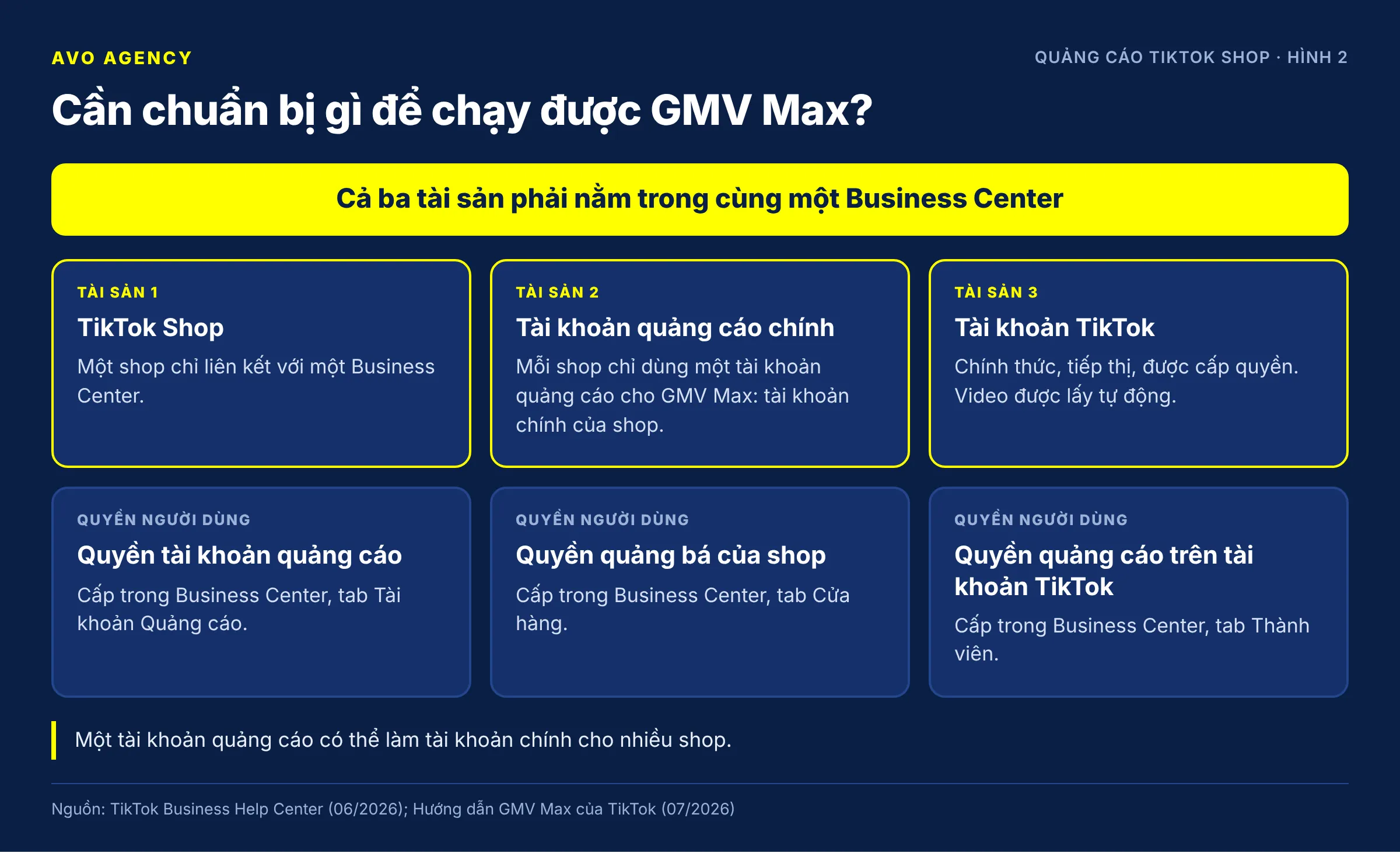
Figure 2: The three assets that must sit in one Business Center and the permissions to grant.
Checklist before creating a campaign:
- The shop is linked to a BC. A shop can be linked to only one BC. Unlinking it can stop every ad that is running.
- There is a primary ad account. TikTok’s help page (June 2026) says each shop uses only one ad account to run GMV Max, and that account must be the shop’s primary ad account. One ad account can be the primary account for several shops. Older TikTok training material describes this differently, so check Account management in your Seller Center to see which account is assigned.
- All TikTok accounts are linked. The official account, marketing accounts and authorized accounts. GMV Max pulls in the videos from these accounts automatically.
- Grant permissions to the operator: permission on the ad account, the shop’s promotion permission, and ad permission on the TikTok accounts. If you create the campaign in Seller Center, you also need the shop’s admin or ads manager role.
- If you hire an agency: every asset is shared to the agency’s BC, and the agency registers GMV Max authorization from the partner BC.
How to spot a missing link: in the Ad creative step, click the number of available TikTok accounts. Any account not in the list is not linked to the shop’s BC. The fastest way to link it is Seller Center > Shop Ads > Account management > Connect account, then scan the QR code with the TikTok app.
Sources: TikTok Business Help Center – GMV Max guidelines (June 2026); Complete GMV Max – TikTok Shop Ads guide, section on checking account links (TikTok, updated July 2026)
3. Should a new shop or a new product run GMV Max right away?
Short answer: A new shop or new product can run GMV Max, but keep the budget small and do not expect a profit straight away. TikTok says GMV Max works for every product, regardless of GMV size or the number of videos at the start. Even so, campaigns under 20 orders/day get no ROI Protection, and new shops are also capped on daily orders.
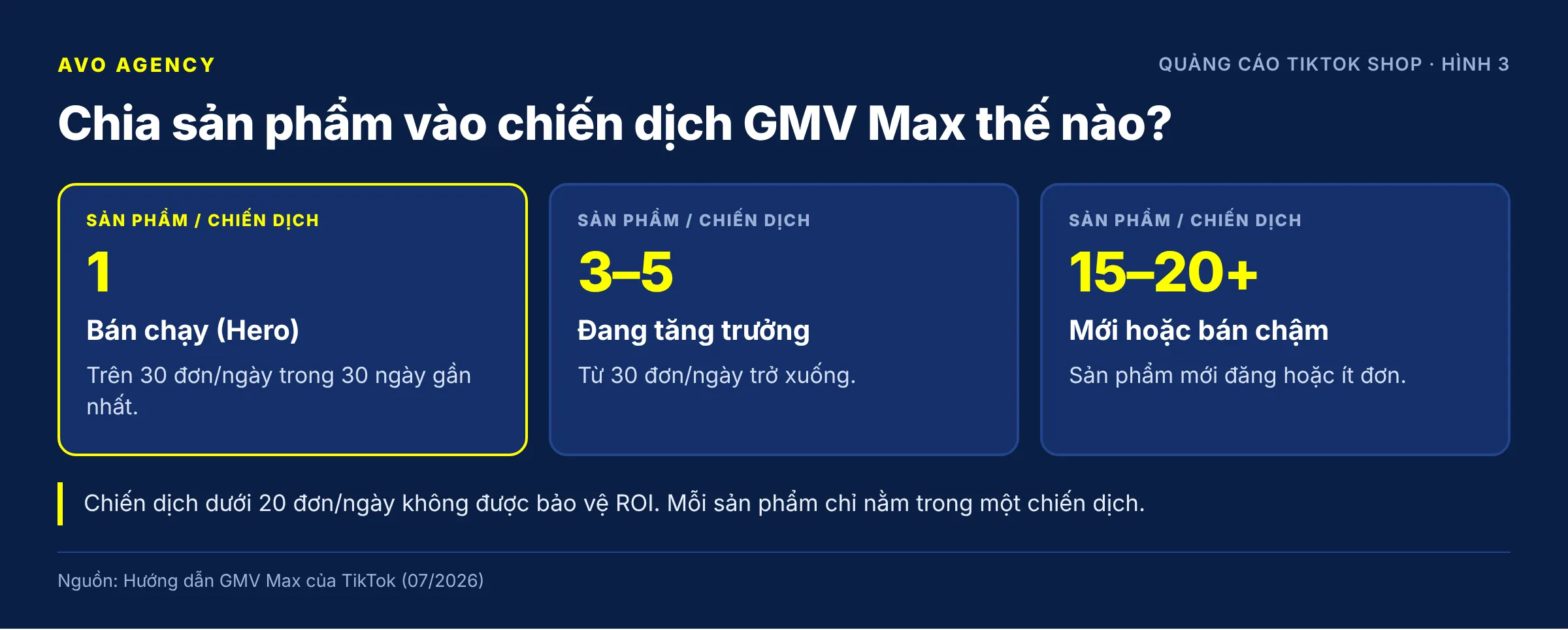
Figure 3: How TikTok recommends grouping products into campaigns by sales strength.
How to split campaigns by sales strength (per TikTok’s GMV Max guide):
| Product group | Criteria | Products per campaign |
|---|---|---|
| Bestseller (Hero) | Over 30 orders/day over the last 30 days | 1 |
| Growing | 30 orders/day or fewer | 3–5 |
| New or slow-selling | Newly listed or few orders | 15–20 or more |
Why new shops should go slowly:
- ROI Protection needs more than 20 orders/day per campaign (see question 9). Below that, you get no refund even if actual ROI falls short of target.
- New shops are capped at 100 orders/day at the Beginner level. Orders above the cap cannot be accepted, yet the ad spend is still gone.
- The system needs data and videos to learn. A product with no organic orders and no reviews converts poorly, so its ads struggle to hit ROI.
Field experience: Many practitioners group weak-selling products into one campaign so that together they exceed 20 orders/day, and only split a product into its own campaign once it reaches 20–30 orders/day on its own. Products grouped together should have similar prices, otherwise the cheap ones take all the impressions. Do not add 0 VND gifts to make up the order count, because their low GMV drags down the whole campaign’s ROI.
AVO’s view: For a new product, the goal of the first two weeks is to find the videos and the price that bring orders, not profit yet. Set the budget at a level you can afford to lose, and only raise it once videos are bringing orders steadily.
Sources: TikTok Business Help Center – About Product GMV Max (January 2026); Complete GMV Max – TikTok Shop Ads guide (TikTok, updated July 2026); TikTok Shop workshop, 11 September 2026 (field experience)
4. How is TikTok ad spend taxed? What is the real cost?
Short answer: TikTok ad spend in Vietnam carries 10% VAT from 1 July 2025, added on top of the top-up amount. To have 1,000,000 VND in your ad account, you pay 1,100,000 VND. If you are an individual or a household business that cannot claim input VAT, your real ad cost is about 10% higher than the figure on the ad dashboard.
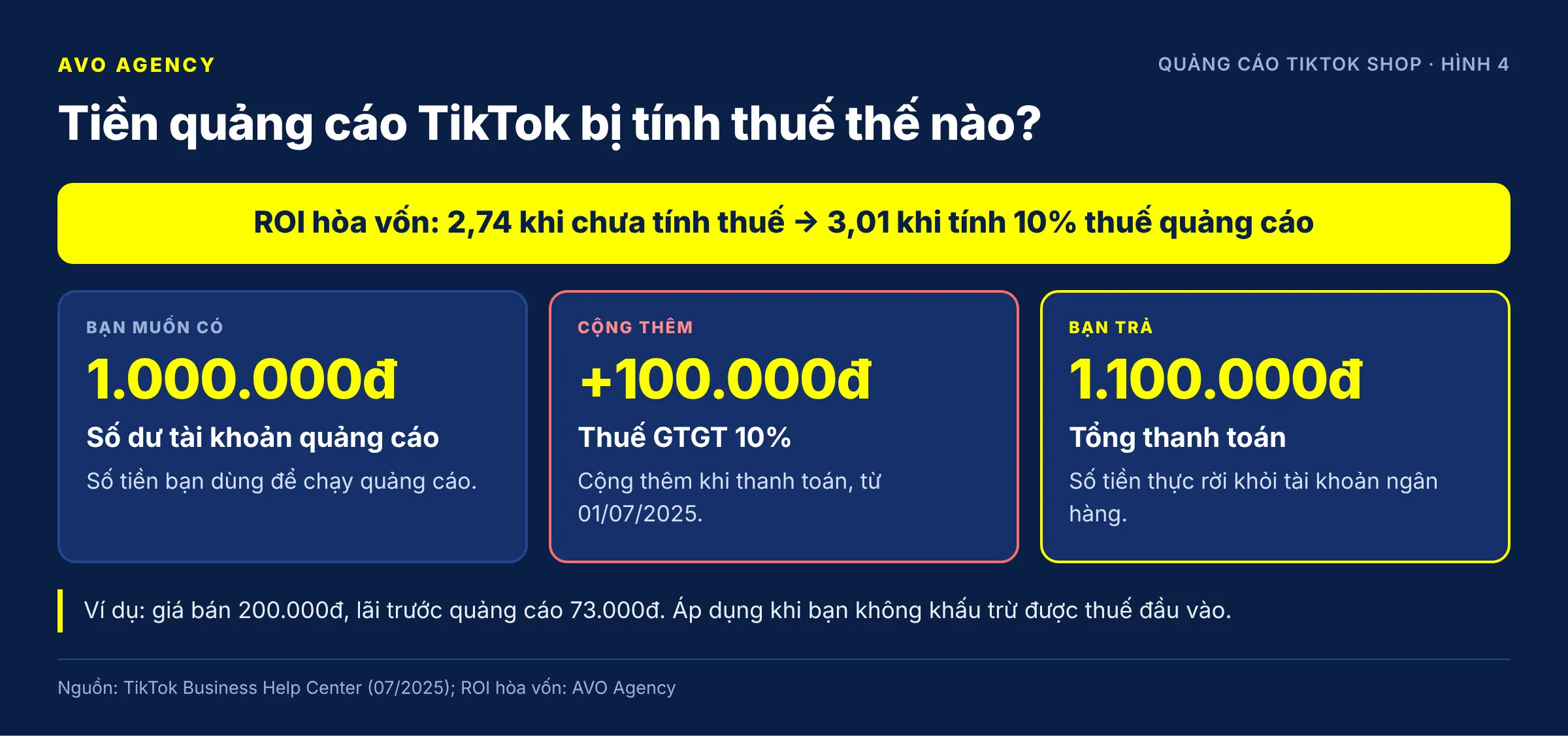
Figure 4: The 10% VAT added at top-up and its effect on break-even ROI.
How it works, using TikTok’s example: account balance 1,000 + 10% VAT of 100 = total payment 1,100. TikTok states that every purchase in Vietnam carries 10% VAT on the total amount, under VAT Law No. 48/2024/QH15. TikTok declares and pays the foreign contractor tax on this portion. Companies and organizations with a tax code should enter it (10 or 13 digits) in the ad account so that it appears on the invoice.
What you save by running GMV Max: according to TikTok Shop Seller Academy, from 19 May 2026 shops whose GMV Max spend reaches at least 4% of GMV over the last 30 days get the transaction fee reduced from 6% to 5%, starting on day 31. Check eligibility at Home > Promote products with a lower transaction fee in Seller Center. The platform may stop the programme or change its criteria. Do not raise ad spend just to reach the 4% mark: spending 4% of GMV to save 1% of GMV only pays off when that ad spend is profitable on its own.
Effect on break-even ROI (AVO’s view):
Take our usual example: a product priced at 200,000 VND with a pre-ad profit of 73,000 VND.
Without ad tax:      break-even ROI = 200,000 ÷ 73,000          ≈ 2.74
With 10% ad tax:     break-even ROI = 200,000 ÷ (73,000 ÷ 1.1)  ≈ 3.01
TikTok’s help page does not say whether the cost column on the ad dashboard includes tax. Because TikTok’s example adds the tax on top of the balance, we understand that the cost column excludes this 10%. Check this against your own top-up invoices. If that is the case and you cannot claim the tax back, use 3.01 rather than 2.74 when deciding your target ROI.
This page is not tax advice. Whether you can claim input VAT depends on your business type and filing method, so ask your accountant.
Sources: TikTok Business Help Center – Vietnam: About Value Added Tax (July 2025); TikTok Shop Seller Academy – Seller fees (4 August 2026); Break-even ROI formula: AVO Agency
Part 2. ROI and budget
5. How is ROI calculated in GMV Max? Why is it higher than the ROAS of the old ads?
Short answer: Product GMV Max ROI equals the total GMV of the products in the campaign divided by ad cost. That total GMV includes orders from ads as well as organic orders and orders through KOCs, as long as they happen while the campaign is running. That is why GMV Max ROI is usually higher than the old ROAS, and the two numbers cannot be compared directly.
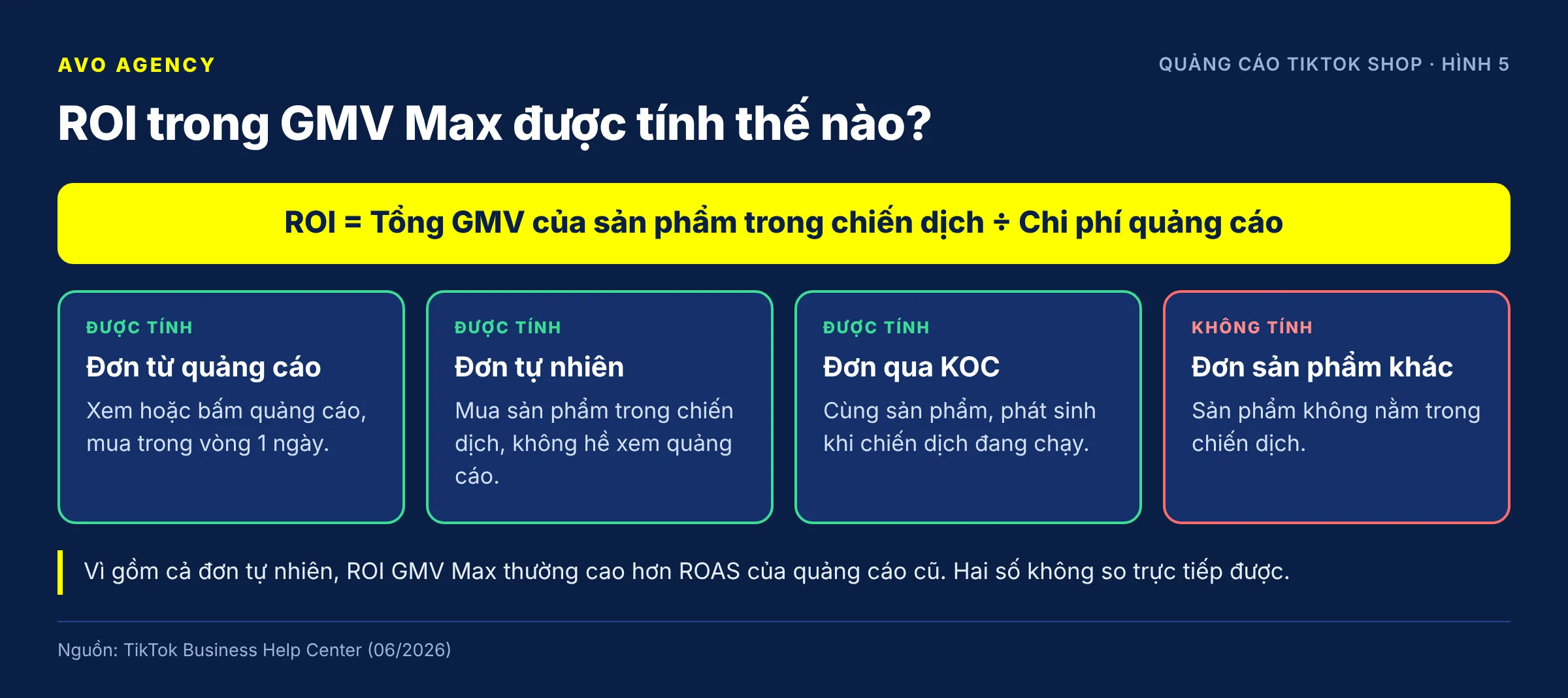
Figure 5: Which orders count towards Product GMV Max ROI.
TikTok’s attribution rules:
| Situation | Counted for GMV Max? |
|---|---|
| Shopper views or clicks an ad for product A and buys A within 1 day | Yes |
| Shopper buys product A while the campaign is running, without seeing any ad | Yes |
| Shopper views an ad for product A and buys 3 days later | No |
| Shopper buys product B, which is not in the campaign | No |
| LIVE GMV Max: every order placed during the LIVE session | Yes |
| LIVE GMV Max: orders placed after the shopper has left the LIVE session | No |
Compared with the old ads:
| VSA/PSA/LSA (old) | Product GMV Max | |
|---|---|---|
| GMV counted | Only orders with ad interaction | All non-LIVE orders of the products in the campaign |
| Attribution window | 7-day click, 1-day view | 1 day |
| Metric | ROAS = ad GMV ÷ cost | ROI = total non-LIVE GMV ÷ cost |
What this means in practice:
- A GMV Max ROI of 4 does not mean the ads brought in 4 dong on their own. Part of it is orders you would have had anyway.
- When working out break-even, use the profit on all orders of that product, not just ad orders. The formula break-even ROI = price ÷ pre-ad profit still works because the ad cost is being spread over all orders.
- KOC orders are also part of this GMV, but you still pay the KOC a commission. If most orders come from KOCs, subtract the average commission from the pre-ad profit before working out break-even.
Sources: TikTok Business Help Center – About attribution for GMV Max (June 2026); Complete GMV Max – TikTok Shop Ads guide, section comparing Product GMV Max with PSA/VSA (TikTok, updated July 2026)
6. What target ROI should I set for GMV Max?
Short answer: Set the GMV Max target ROI at the level the system recommends or slightly lower, as long as it stays above the product’s break-even ROI (price divided by pre-ad profit). TikTok calculates the recommended ROI as past non-LIVE GMV divided by past ad cost, and advises keeping each ROI level for at least 3 days. The higher the target ROI, the harder it is for the ads to spend.
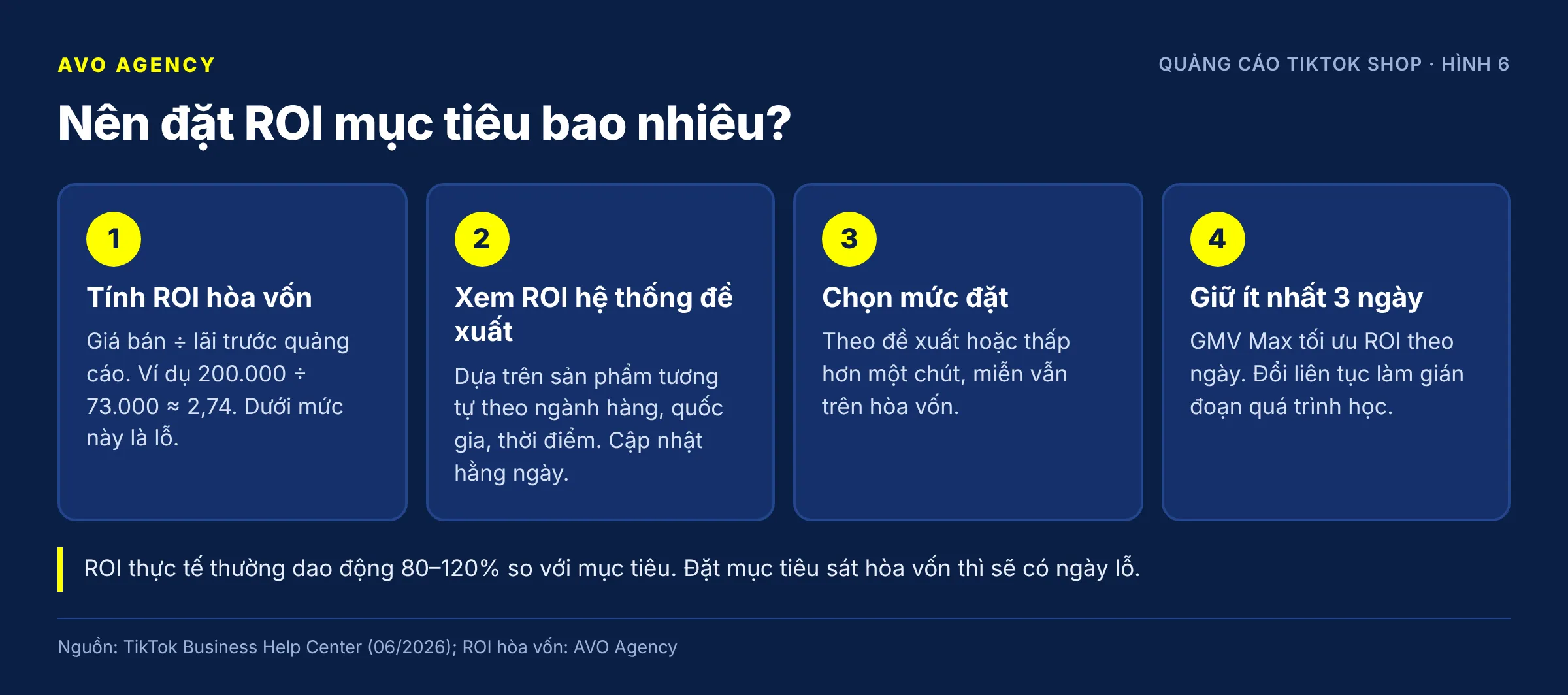
Figure 6: Three steps to choose a target ROI for a GMV Max campaign.
How to do it:
- Work out break-even ROI = price ÷ pre-ad profit. For example 200,000 ÷ 73,000 ≈ 2.74 (or 3.01 including ad tax, see question 4). Below this level you lose money.
- Check the system’s recommended ROI right at the target-setting step. TikTok says the recommendation is based on data from similar products by category, country, time and content type, and is updated daily.
- Choose the level:
| Comparison | What to do |
|---|---|
| Recommendation above break-even | Set it at the recommendation or slightly lower, as long as it stays above break-even |
| Recommendation close to break-even | Set it near break-even, accept a thin margin to gather data, and work on cost price and videos in parallel |
| Recommendation below break-even | The problem is your margin or price; adjusting the ads will not fix it |
- Keep it unchanged for at least 3 full days. TikTok explains that GMV Max optimizes ROI day by day, and frequent changes interrupt learning.
Note on the variance: TikTok’s material says achieved ROI usually ranges from 80–120% of the target. Set a target of 4 and some days you get 3.2, others 4.8. If your break-even is 3.01 and you set a target of 3.1, you will almost certainly have losing days.
AVO’s view: We usually set the target ROI at least 15–20% above break-even at the start, then lower it in small steps when the campaign does not spend its budget. The 15–20% figure is our own operating habit, not a TikTok rule.
Sources: TikTok Business Help Center – Best practices for Product GMV Max (June 2026); TikTok Business Help Center – About ROI recommendation for GMV Max campaigns (March 2026); Complete GMV Max – TikTok Shop Ads guide (TikTok, updated July 2026)
7. How much daily budget should I set for GMV Max, and how should I raise it?
Short answer: TikTok recommends a GMV Max daily budget of 2 times past non-LIVE GMV divided by the target ROI, always leaving enough headroom that spend stays below 80%. When the campaign spends 80% of its budget or more, raise it by about 30% at a time. You can turn on Auto Budget Increase so the system adds 50% each time, up to 10 times a day.
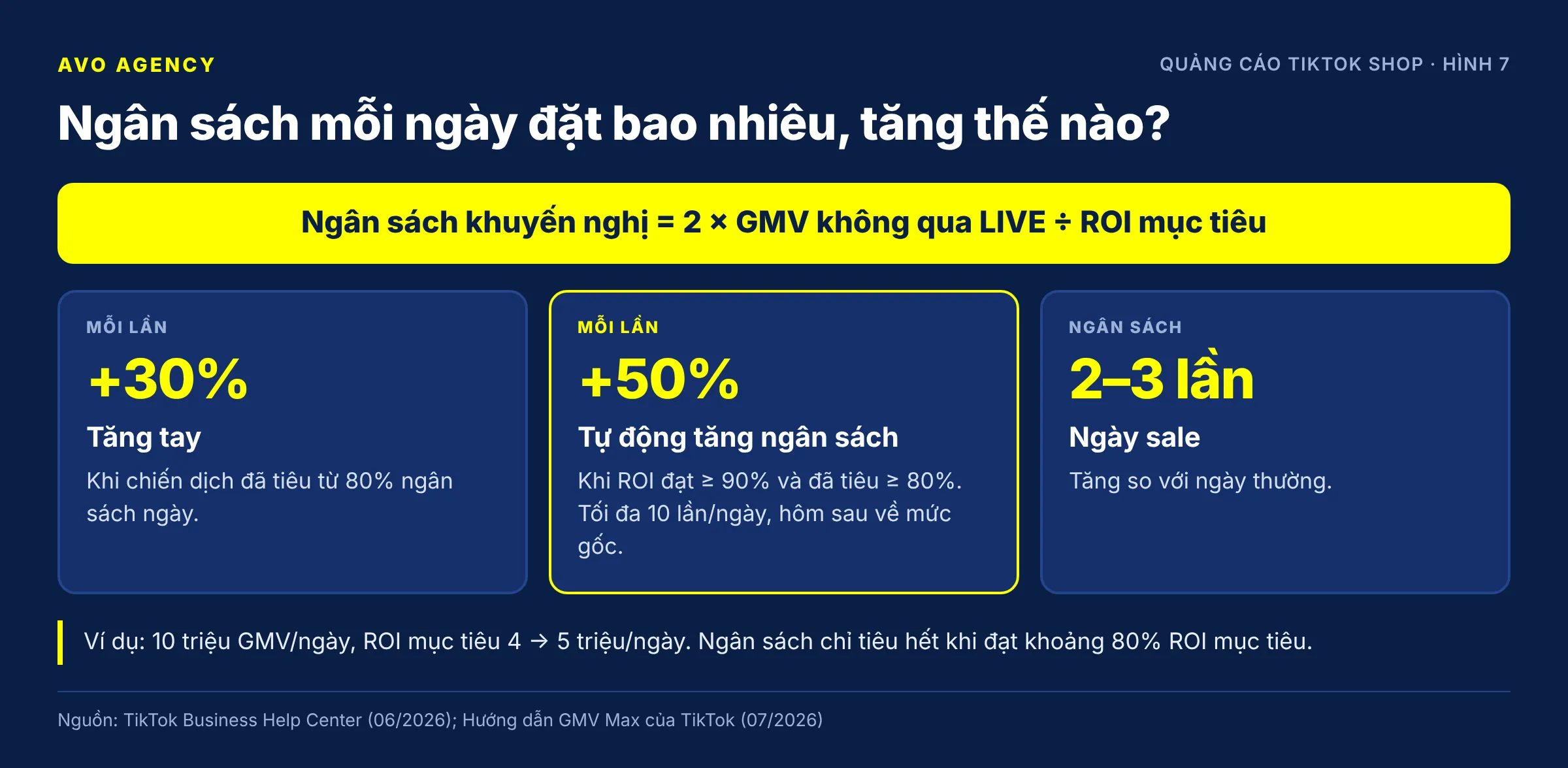
Figure 7: The recommended budget formula and two ways to raise the budget.
Example: a product currently sells about 10 million VND of non-LIVE GMV a day, with a target ROI of 4.
Recommended budget = 2 × 10,000,000 ÷ 4 = 5,000,000 VND/day
We read “past GMV” here as the daily average. TikTok’s material does not state the time period, so compare against the budget the system recommends on the campaign creation screen.
Adjustment rules (per TikTok’s GMV Max guide):
| Situation | Action |
|---|---|
| Normal day, spending 80% of budget or more | Raise by about 30% at a time |
| Normal day, spending under 50% | Do not raise the budget yet; review ROI and videos (question 8) |
| Sale day | Raise 2–3 times (see question 17) |
Auto Budget Increase:
- Triggers when two conditions are met at the same time: ROI achievement of 90% or more and 80% or more of the budget spent.
- Each increase is 50%, up to 10 times/day. The next day the budget goes back to the original level.
- Turn it on or off at any time. While it is on you can still edit by hand, as long as the new budget is greater than the current cost × 1.05.
- Can be used together with Promotion Day.
The key point: the budget only gets fully spent when the campaign reaches at least about 80% of its target ROI. A high budget will not make you spend more if the target ROI is set too high.
Field experience: A common mistake is setting the same budget for every campaign. Practitioners usually set a moderate base budget per product, turn on Auto Budget Increase and set a cap if the account offers one, so good sales days do not run out of money halfway. The budget can be changed several times a day; the ROI should not be.
Sources: TikTok Business Help Center – Best practices for Product GMV Max (June 2026); Complete GMV Max – TikTok Shop Ads guide, Auto Budget Increase section (TikTok, updated July 2026); TikTok Shop workshop, 11 September 2026 (field experience)
8. Why is my GMV Max campaign not spending, or spending very little?
Short answer: A GMV Max campaign that does not spend usually has one of three causes: the target ROI is set higher than the product can deliver, too few videos are being delivered, or an asset is blocked (no balance, product rejected, video not authorized, account not LIVE). Check in this order: status, videos, then ROI, and lower the ROI by less than 10% at a time.
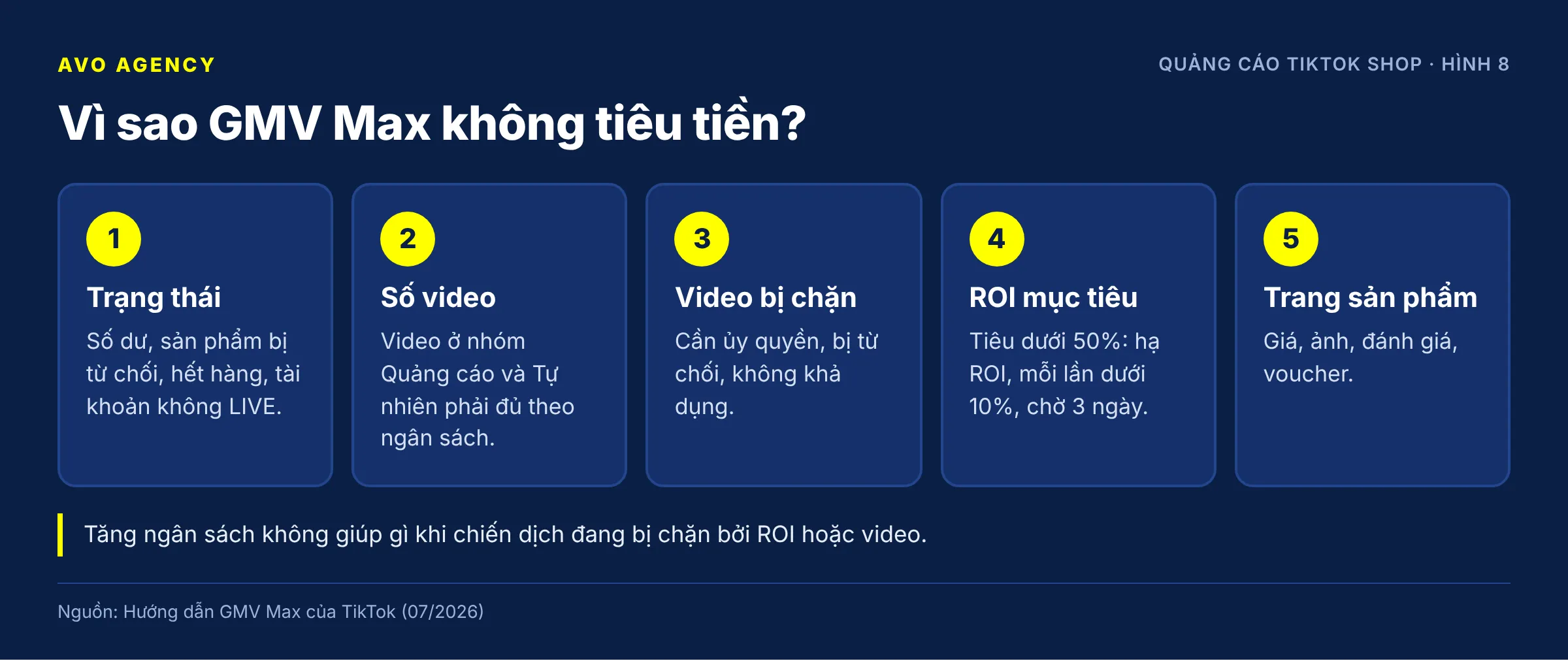
Figure 8: The order of checks when a GMV Max campaign is not spending its budget.
Check in this order:
- Campaign and account status. Is there balance left, are products rejected or out of stock, is the shop restricted? For LIVE GMV Max, the campaign only delivers while the account is LIVE and resumes on its own when you go LIVE again.
- Number of videos being used as ads. Go to View details > View creatives. The number of videos in the “Ads and Organic” group should be at least equal to the “Organic only” group, and enough for your budget level (see question 11).
- Blocked videos. Filter the statuses Authorization needed, Rejected and Unavailable, and deal with each group (see question 12).
- Target ROI. If you spend under 50% of the budget, lower the target ROI by less than 10% each time, then wait at least 3 days. Note that the day you change the ROI loses ROI Protection (see question 9).
- The product. Price, images, reviews, vouchers. Ads only bring shoppers to the product page; closing the sale is the product page’s job.
If you have done all of this and it still does not spend (field experience): turn on Max Delivery for one product with a small budget, about 300,000 VND, and set an end time 24–48 hours later. Practitioners report that the number of delivering videos usually rises clearly after about a day. This has a price: a campaign with a product on Max Delivery loses ROI Protection, so run it briefly and with an end time.
AVO’s view: The usual reflex when ads do not spend is to raise the budget. That does not work, because the campaign is held back by ROI or videos, not by budget.
Sources: Complete GMV Max – TikTok Shop Ads guide (TikTok, updated July 2026); TikTok Business Help Center – Troubleshoot your LIVE GMV Max campaign (March 2026); TikTok Shop workshop, 11 September 2026 (field experience)
9. If actual ROI falls short of target, do I get compensated? How does GMV Max ROI Protection work?
Short answer: Yes, if the GMV Max campaign qualifies for ROI Protection. When a campaign’s actual ROI is below 90% of the target ROI and the campaign has more than 20 orders/day, TikTok automatically refunds the difference as ad credit. The formula: ad credit = cost − gross revenue ÷ (target ROI × 0.9). Many routine actions cancel protection for that day.
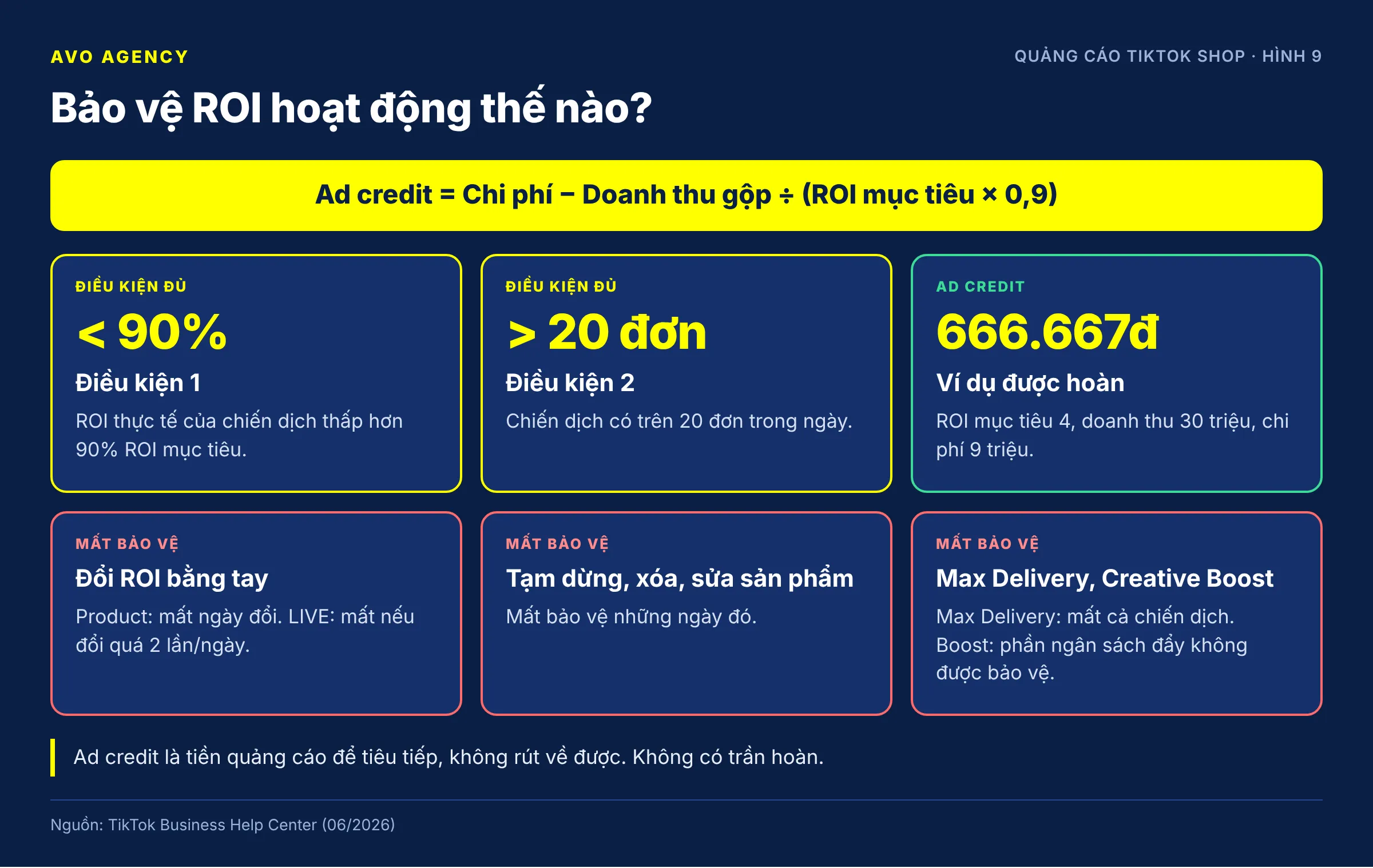
Figure 9: Conditions, formula and the actions that cancel ROI Protection.
Example (illustrative figures, using TikTok’s formula): target ROI 4, gross revenue for the day 30,000,000 VND, ad cost 9,000,000 VND, actual ROI 3.33 (83% of target).
Ad credit = 9,000,000 − 30,000,000 ÷ (4 × 0.9)
          = 9,000,000 − 8,333,333
          = 666,667 VND
After the refund, your real cost is equivalent to achieving 90% of the target ROI.
Actions that leave that day WITHOUT protection (per TikTok Business Help Center, June 2026):
| Action | Product GMV Max | LIVE GMV Max |
|---|---|---|
| Changing the target ROI by hand | Protection lost on the day of the change | Lost if changed more than 2 times in the day |
| Pausing or deleting the campaign | Lost | Lost |
| Editing the campaign’s product list | Lost | Not applicable |
| Using Max Delivery | Lost | Lost |
| Creative Boost or Viewer Boost budget | That budget is not protected | That budget is not protected |
| No balance, product or ad rejected, policy violation | Lost | Lost |
| Not more than 20 orders that day | Lost | Lost |
Also worth knowing:
- An ROI lowered automatically by Promotion Day or Mega LIVE is a system change and does not cancel protection. Ad credit is then calculated on the Promotion Day target ROI.
- You do not have to follow the system’s recommended ROI and budget to be protected.
- There is no cap on the refund, as long as the campaign qualifies.
- Ad credit is added to the ad account automatically. According to the GMV Max guide, processing takes about 7 days. Check it via the ROI Protection status label on each campaign, under View history, kept for up to 60 days.
- Ad credit is ad money to keep spending, not cash you can withdraw.
AVO’s view: ROI Protection only brings you back to 90% of target; it does not guarantee a profit. If your target ROI is below break-even, you still lose money even with the full refund. One point that is easy to confuse: TikTok’s training material advises not changing the ROI more than once a day, while the ROI Protection terms on the Help Center say clearly that for Product GMV Max, a single manual change loses protection for that day. The two statements do not contradict each other, but remember the second one.
Sources: TikTok Business Help Center – About ROI protection for GMV Max campaigns (June 2026); Complete GMV Max – TikTok Shop Ads guide, ROI Protection section (TikTok, updated July 2026)
10. Should I pause, restart or edit GMV Max campaigns often?
Short answer: No, avoid pausing, restarting or editing GMV Max campaigns often. Every pause, ROI change or product edit loses ROI Protection for that day and interrupts learning. TikTok advises running for at least 3–5 days, ideally 2 weeks, and keeping each ROI level for at least 3 days. When you need to spend less, lowering the budget is safer than turning the campaign off.
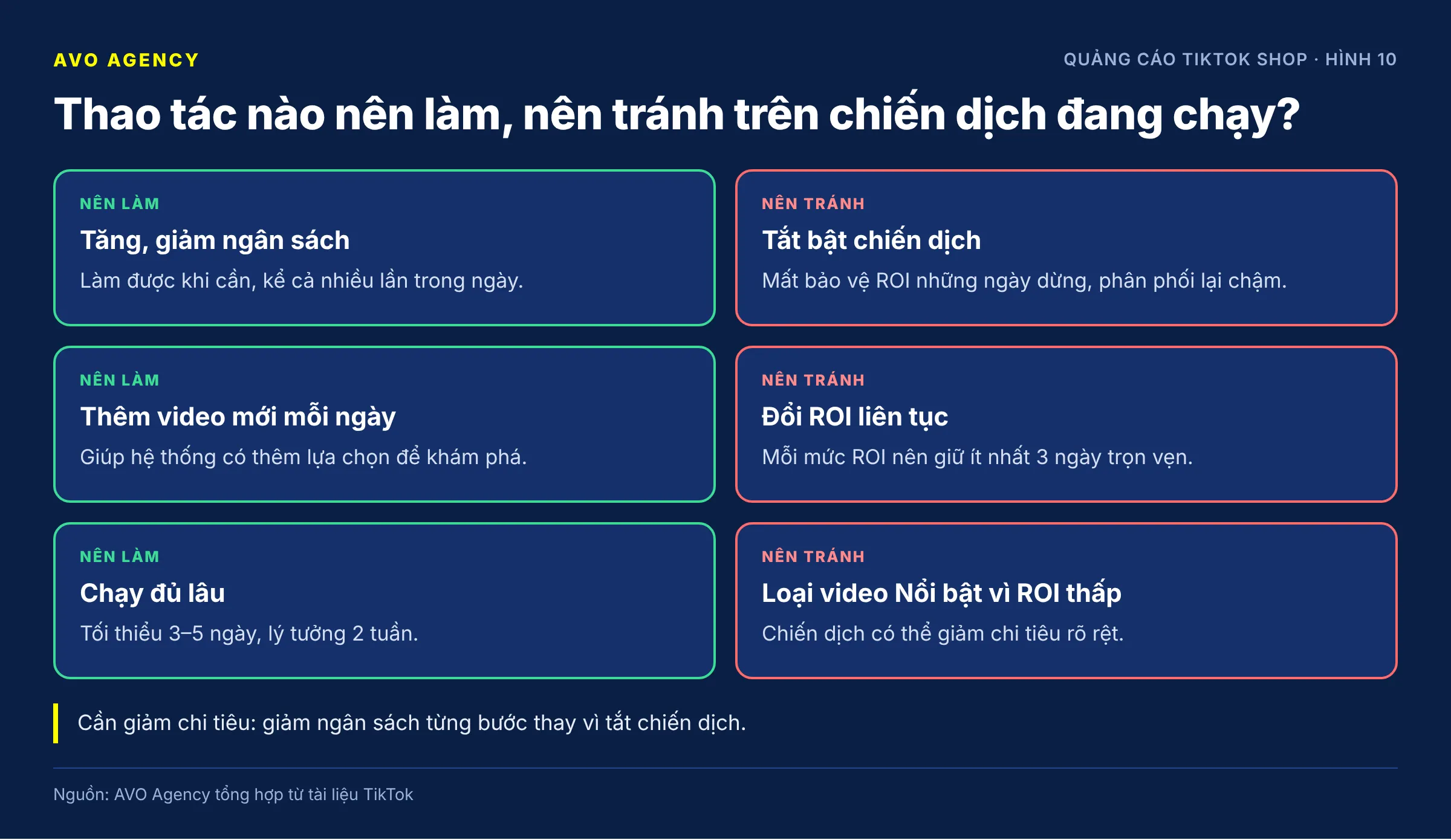
Figure 10: Actions to take and to avoid on a running campaign.
| Action | Impact | Recommendation |
|---|---|---|
| Raising or lowering the budget | Low | Fine when needed, even several times a day |
| Adding new videos | Positive | Do it every day |
| Changing the target ROI | Loses ROI Protection that day (Product GMV Max) | At most once, then wait at least 3 days |
| Pausing the campaign | Loses ROI Protection on the paused days | Avoid; if you must pause, keep it short |
| Deleting and recreating the campaign | Loses ROI Protection, has to start again | Only when you need to change the product structure |
| Excluding videos | Depends on the video | Only exclude videos that violate policy or carry wrong information |
Before turning a campaign off, ask yourself three questions (field experience): have I adjusted the budget, have I dealt with the ROI, have I dealt with the videos? According to practitioners, a pause of under about 24 hours is usually fine, while a longer pause often means the campaign takes 2–3 days to deliver as before.
Good news if you have to create a new campaign: according to TikTok’s July 2026 update, video learning data carries over between campaigns, so videos do not have to learn from scratch.
Criteria for “the campaign is at full capacity” (field experience): consistently achieving 90% or more of the target ROI and spending 80% or more of the budget. If it has not reached both, there is still room to optimize videos and products before thinking about starting over.
Sources: TikTok Business Help Center – Best practices for Product GMV Max (June 2026); TikTok Business Help Center – About ROI protection for GMV Max campaigns (June 2026); Complete GMV Max – TikTok Shop Ads guide (TikTok, updated July 2026); TikTok Shop workshop, 11 September 2026 (field experience)
Part 3. Videos for ads
11. How many videos does GMV Max need, and where do I get them?
Short answer: Each Product GMV Max campaign needs at least 10 videos plus at least 1 new video a day; spending over 200 USD/day needs 15 or more videos, and over 1,500 USD/day needs 80 or more. Videos come from four sources: linked TikTok accounts, creators’ video authorization codes, videos without product links that you pair manually, and KOC videos with bulk authorization turned on.
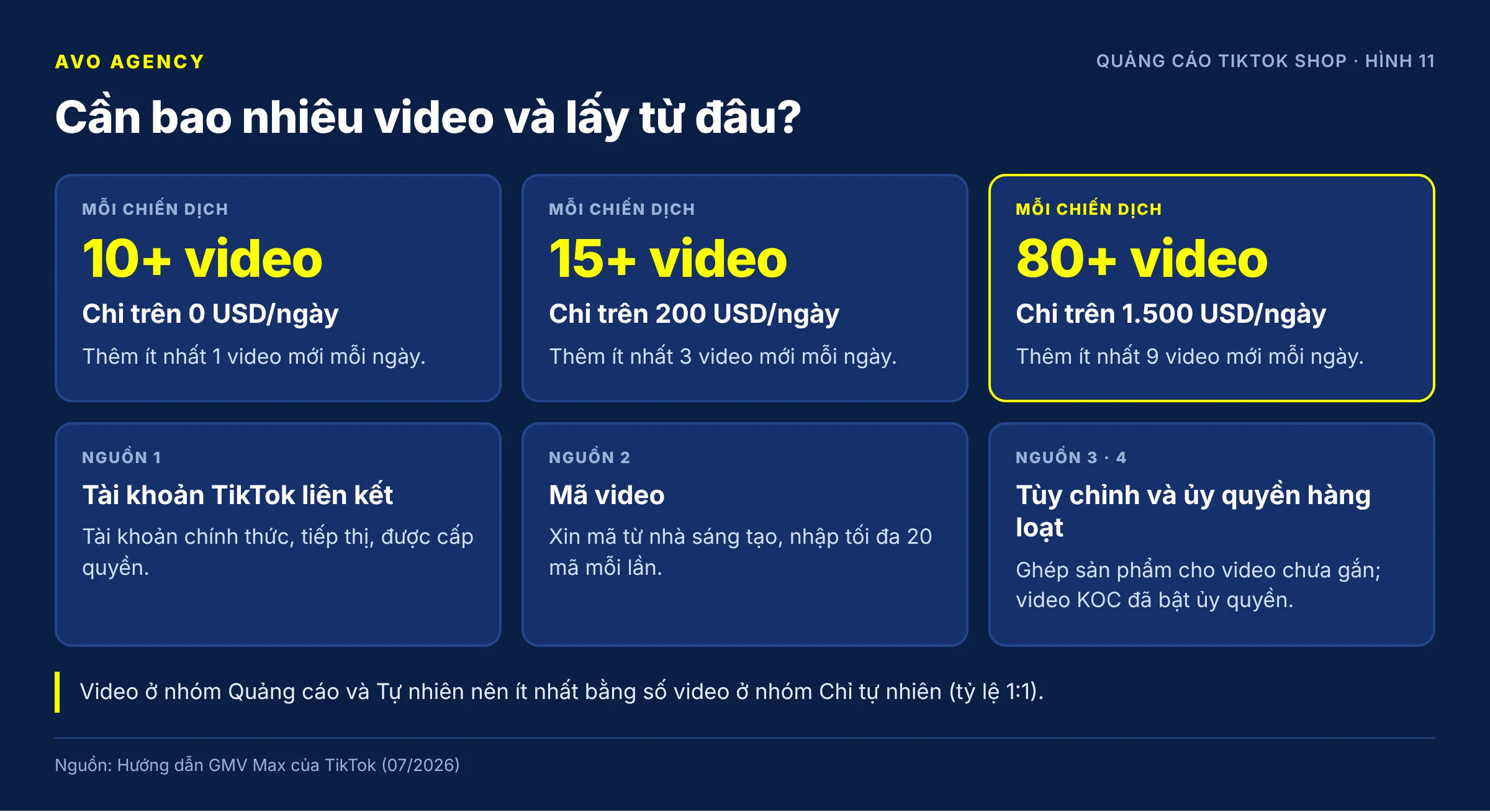
Figure 11: Recommended number of videos by spend level and the four video sources for Product GMV Max.
| Daily spend | Videos per campaign | New videos per day |
|---|---|---|
| Over 0 USD | 10+ | 1+ |
| Over 200 USD (about 5 million VND) | 15+ | 3+ |
| Over 1,500 USD (about 39 million VND) | 80+ | 9+ |
TikTok’s original thresholds are in USD; the VND amounts are approximate conversions and change with the exchange rate.
Four ways to get more videos:
- Linked TikTok accounts. Link more marketing accounts and authorized accounts. In Seller Center, if an account still shows an “Authorize now” or “Edit access” button, it has not granted full ad permissions.
- Video codes. Ask creators whose videos sell well for their authorization codes. Go to Creative management > Add posts > Video code and paste up to 20 codes at a time.
- Custom posts. Videos without a product link can be paired with a product right inside the campaign. This pairing only applies within the ads and must be redone if you create a new campaign.
- KOC bulk authorization. See question 14.
Quick check for enough videos: in View details > View creatives, compare the number of videos in “Ads and Organic” with “Organic only”. The ratio should be 1:1 or higher. If most videos sit in “Organic only”, you have the videos but not the right to use them in ads.
Keep video selection on Automatic. Manual mode is limited to 50 videos and cannot use bulk-authorized videos.
Sources: Complete GMV Max – TikTok Shop Ads guide, video management section (TikTok, updated July 2026); TikTok Business Help Center – Best practices for Product GMV Max (June 2026)
12. What do the video statuses in GMV Max mean, and how should I handle them?
Short answer: Since the July 2026 update, videos in GMV Max fall into three status groups: Exploring (under 3 days or under 1,000 paid impressions), Explored (made up of Standout, Effective, Underperforming and Calculating) and Ineligible. You only need to act on two groups: Underperforming and Ineligible.
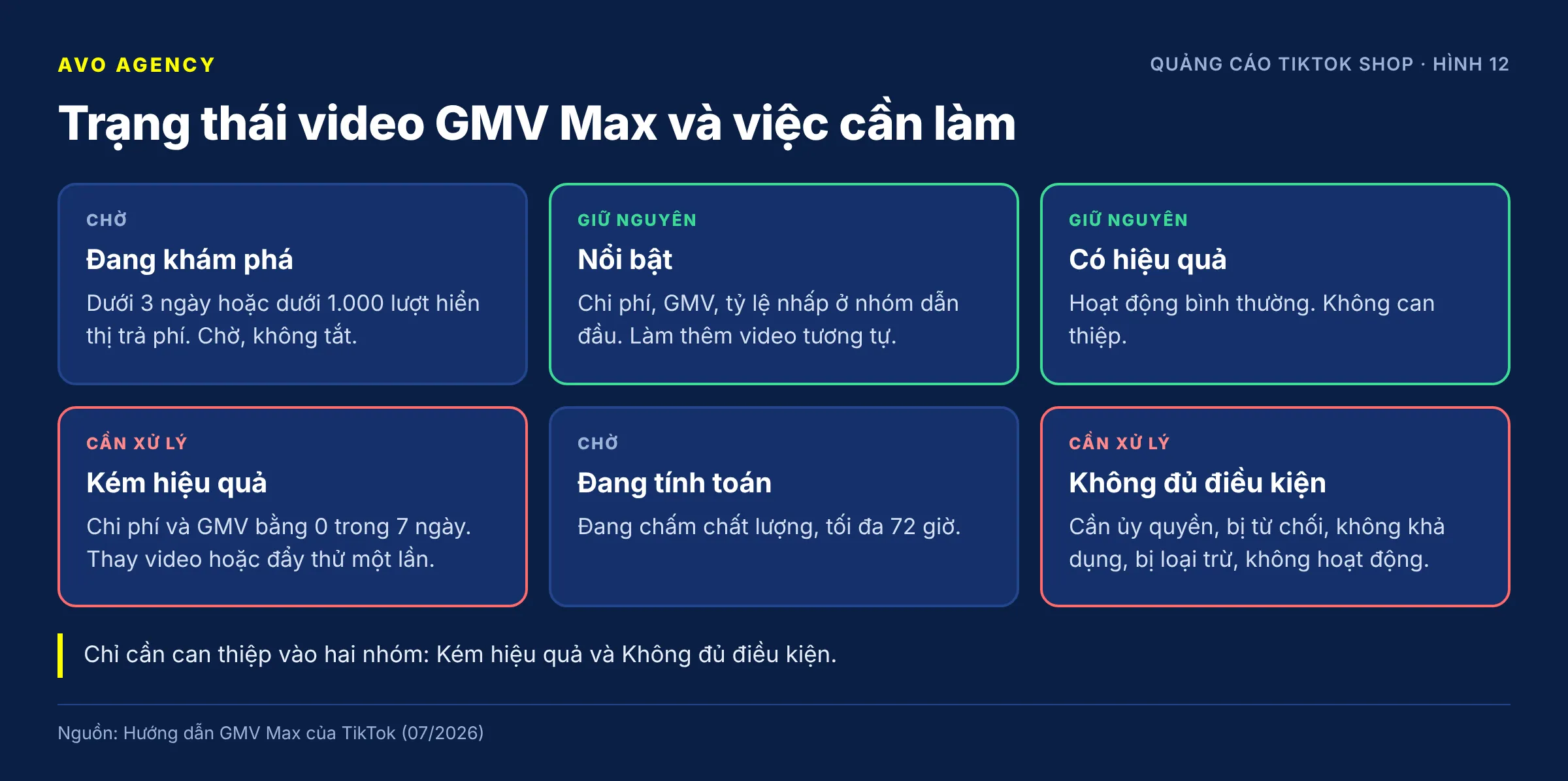
Figure 12: The GMV Max video status framework and what to do for each status.
| Status | Condition | What to do |
|---|---|---|
| Exploring | Under 3 days or under 1,000 paid impressions | Wait, do not turn it off |
| Standout | Cost, GMV contribution and click-through rate in the leading group | Leave it; make more videos like it |
| Effective | In the middle, neither outstanding nor weak | Do not intervene |
| Underperforming | Zero cost and GMV over the last 7 days | Replace with a new video or try one boost |
| Calculating | Just finished exploring, quality being scored, up to 72 hours | Wait |
| Ineligible | Authorization needed, rejected, unavailable, excluded, inactive | Fix according to the cause |
For LIVE GMV Max, a video moves to Explored after 1 day or 1,000 impressions.
Handling the Ineligible group:
- Authorization needed: authorize it yourself or send a request to the creator. The status updates within about 20 minutes of authorization.
- Rejected: read the reason TikTok shows, fix it and appeal right in the interface.
- Unavailable: the video is private, deleted, or the account is suspended.
- Inactive: an old video, with no conversions in 30 days, a low click-through rate, or out of season.
Reading the exploration summary (Product GMV Max): the three metrics Available, Explored and Standout are compared with the benchmark for your category, GMV tier and region.
| Low metric | TikTok’s suggested fix |
|---|---|
| Number of available videos | Add new videos, restore invalid videos |
| Explored rate | Loosen ROI or budget, use the testing tools |
| Standout rate | Improve quality, learn from the videos that are standing out |
Field experience: Only deal with Underperforming videos; do not act on videos with a low ROI. A Standout video with a low ROI is being balanced by the other videos, as long as the whole campaign hits its ROI. Practitioners who tried excluding low-ROI Standout videos saw campaign spend drop sharply. If you want a higher campaign ROI, make more videos like the standouts instead of cutting.
Sources: Complete GMV Max – TikTok Shop Ads guide, video status section updated July 2026 (TikTok); TikTok Shop workshop, 11 September 2026 (field experience)
13. What are Creative Boost and Max Delivery in GMV Max? When should I use them?
Short answer: Creative Boost and Max Delivery are two GMV Max tools that push spend beyond the target-ROI mechanism, and neither one guarantees ROI. Creative Boost adds a separate budget for each video you choose, up to 100 videos per campaign. Max Delivery spends the whole budget on one product or LIVE session without an ROI constraint. To prioritize new videos while keeping ROI, use New Creative Testing Mode.
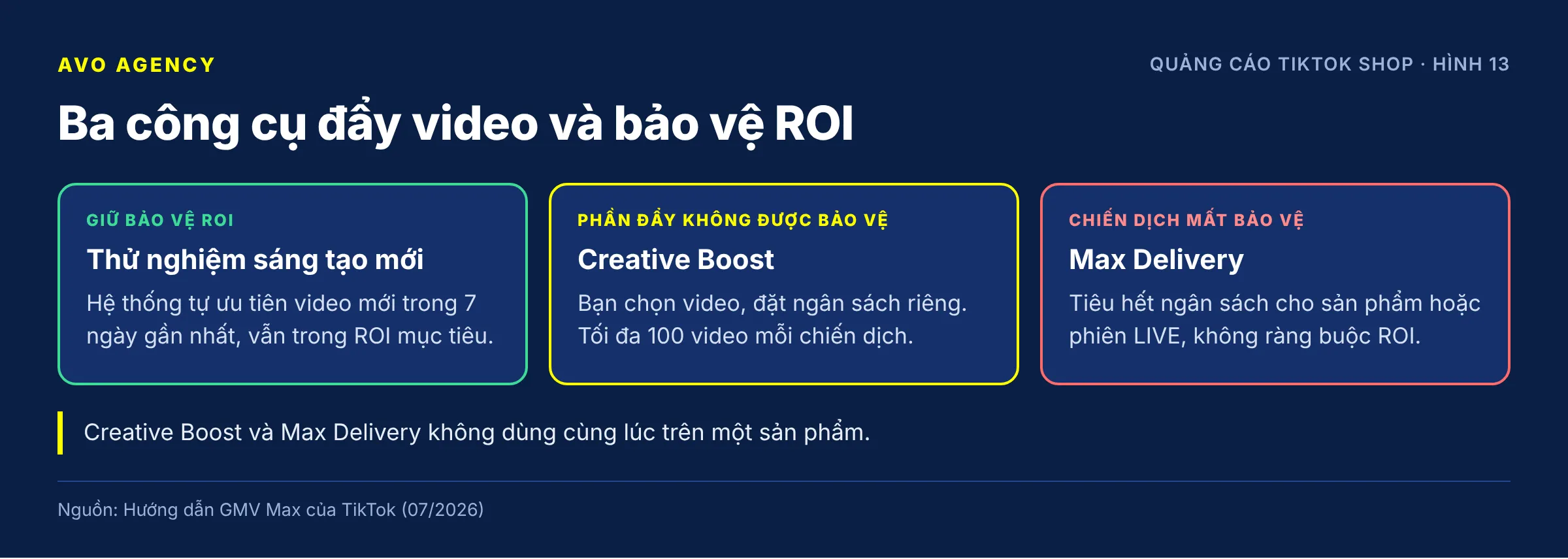
Figure 13: Comparison of three video-boosting tools and their effect on ROI Protection.
| New Creative Testing | Creative Boost | Max Delivery | |
|---|---|---|---|
| How it works | The system prioritizes new videos from the last 7 days | You pick videos and set a separate daily budget | Spends the whole budget, no ROI constraint |
| ROI guarantee | Yes, still within the target ROI | No, for the boosted budget | No |
| Campaign ROI Protection | Unchanged | The boosted part is not protected | A campaign with a product on Max Delivery loses protection |
| Use when | New videos are rarely tested | You trust a good video the system is not spending on yet | The campaign is not spending; peak hours on sale days |
Technical notes:
- Creative Boost budget is spread evenly over the day and the system will spend all of it. For LIVE GMV Max, the minimum budget is 10 USD/day per video.
- You cannot set Creative Boost on videos of a product that is in Max Delivery mode, and vice versa. Stop one before turning on the other.
- To stop Creative Boost, delete that boost.
How to use Creative Boost (field experience):
- Only boost videos that are still exploring but already have orders, so they get through exploration faster. Do not boost videos that are already Standout or Effective.
- A shared budget for a group of videos (for example 150,000–175,000 VND for 4–5 videos) is usually cheaper than boosting videos one by one.
- To rescue an Underperforming video that used to bring cheap orders: boost 50,000 VND for 24 hours, with an end time, once only. If it brings orders, the video returns to delivery; if not, drop it.
The amounts above are practitioners’ examples for small shops, not TikTok standards.
Sources: Complete GMV Max – TikTok Shop Ads guide, Creative Boost and New Creative Testing Mode sections (TikTok, updated July 2026); TikTok Business Help Center – About ROI protection for GMV Max campaigns (June 2026); TikTok Shop workshop, 11 September 2026 (field experience)
14. How do I use KOC videos in GMV Max ads?
Short answer: There are two ways to use KOC videos in GMV Max ads: the KOC turns on bulk authorization so that every video linked to your products enters the campaign automatically, or the KOC sends a video code for each video. Unauthorized videos stay in the “Organic only” group and cannot be used as ads. Videos linked to products from several shops are excluded by default.
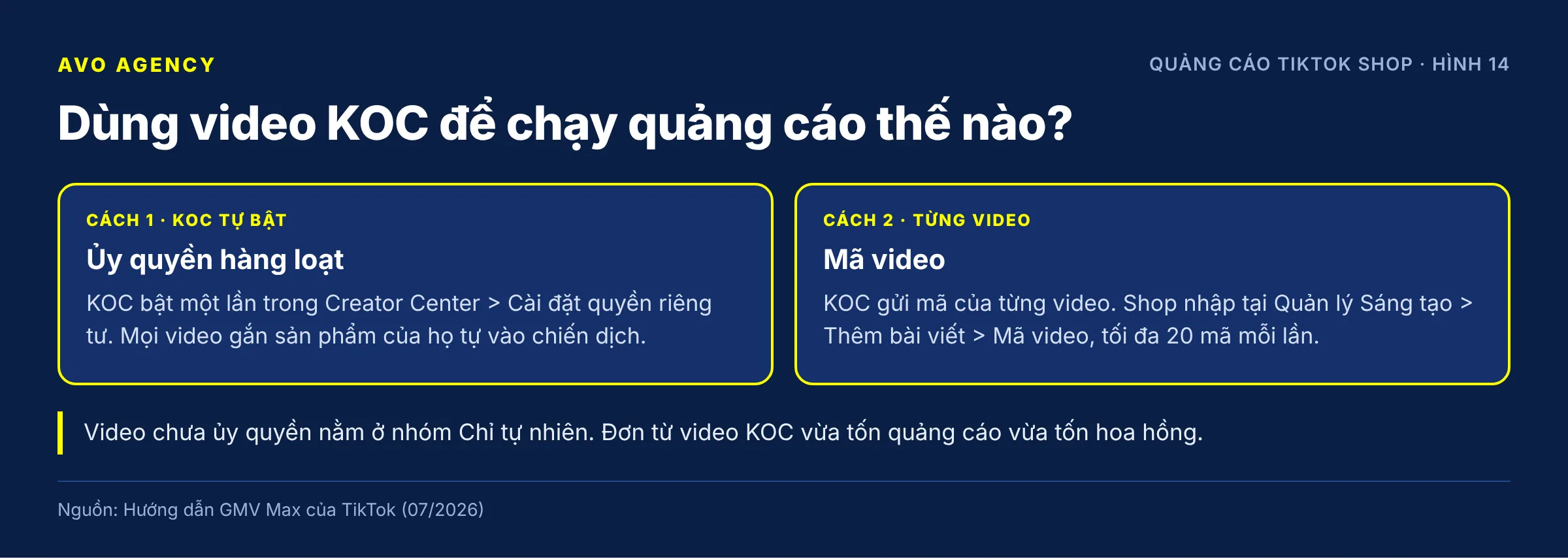
Figure 14: Two ways to get permission to use KOC videos in GMV Max ads.
Option 1 – Bulk authorization (the KOC turns it on once):
- When adding a product to their showcase, the KOC sees the prompt “Earn extra commission from linked videos” and taps Turn on; or
- In TikTok Shop Creator Center > Settings > Privacy settings, they turn on “Allow sellers to use linked videos in Shop Ads”.
Option 2 – Video code (per video): the KOC gets the video’s ad authorization code and sends it to the shop. The shop enters it under Creative management > Add posts > Video code. This also works for videos without a product link; the shop then pairs the product using a custom post.
What the shop needs to do:
- Check whether your best-selling KOCs have turned on bulk authorization, in Affiliate Center or directly in the campaign’s video list.
- Prioritize asking for rights to videos in the “Organic only” group with good conversion rates and order counts.
- In the video source settings, Affiliate Posts can be turned on or off. Turn it off if you only want to advertise with your shop’s own channel videos.
Cost consideration: orders from KOC videos count towards the campaign’s GMV, and you still pay the KOC commission on those orders. Such an order carries both the ad cost and the commission. If KOCs bring most of your revenue, recalculate break-even ROI with the commission deducted, or see the option to optimize on ROI including affiliate costs in question 19.
Sources: Complete GMV Max – TikTok Shop Ads guide, section on increasing video volume (TikTok, updated July 2026)
Part 4. LIVE GMV Max
15. How is LIVE GMV Max different from Product GMV Max, and what should I watch out for?
Short answer: LIVE GMV Max advertises the LIVE session of one TikTok account and only delivers while that account is broadcasting. The system automatically picks the videos that lead into the LIVE from that same account’s best-performing videos of the past 30 days. Every order placed during the LIVE session counts for the campaign. Each account should have only one LIVE GMV Max campaign.
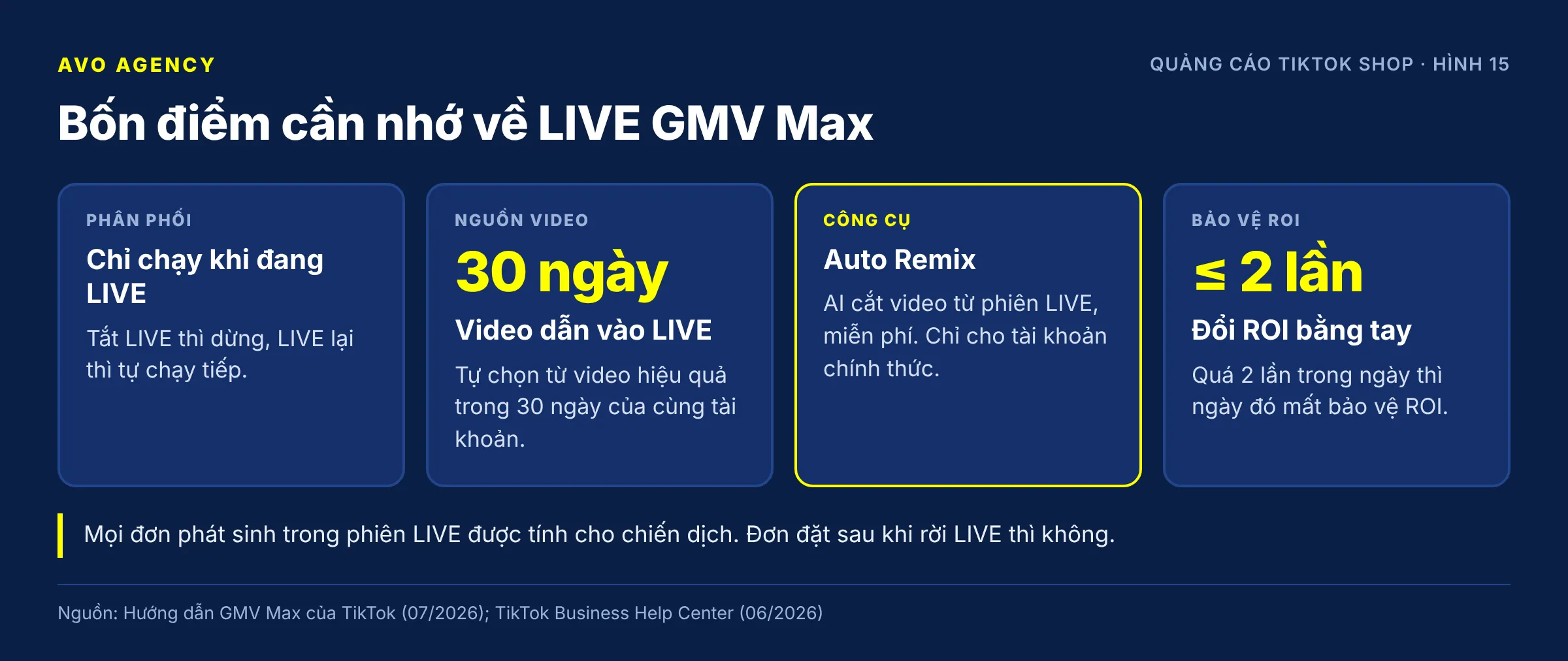
Figure 15: Four points to remember when running LIVE GMV Max.
How it differs from Product GMV Max:
- It only runs while you are LIVE. End the LIVE and the ads stop; go LIVE again and they resume automatically. You do not need a new campaign for each session.
- The videos leading into the LIVE are chosen automatically from 30 days of data for the same account. Videos from other accounts and videos previously rejected for ads are not used. If the LIVE source is the official account, you can also turn on videos from the shop’s marketing accounts.
- Cannot select the LIVE account? This is usually because an LSA ad or another LIVE GMV Max campaign is still running on that account. Turn off LSA at ad group level, and reactivate the old LIVE GMV Max campaign instead of creating a new one.
- ROI Protection is slightly more forgiving: for LIVE, the day only loses protection if you change the ROI by hand more than 2 times.
Supporting tools:
| Tool | What it does | Notes |
|---|---|---|
| Auto Remix | AI cuts short videos from the LIVE session to use as ads, free of charge | Only for LIVE from the official account. TikTok reports that shops using it saw 21% extra GMV |
| Priority videos | Choose up to 10 videos for the system to prioritize | Update them to match each session’s content |
| Viewer Boost | Buy extra viewers with a separate budget | Minimum 10 USD/day, no ROI constraint, not covered by ROI Protection |
| Creative Boost | Boost specific videos that lead into the LIVE | Minimum 10 USD/day per video, no ROI guarantee |
Some of these tools are still in testing and only available to some accounts.
Field experience: Use one long-running campaign per LIVE account so the system builds up data, add teaser videos before each session and adjust the budget on that same campaign. Only create per-day campaigns when you must lock the budget for each session. To raise LIVE ROI there are two paths: add more videos leading into the LIVE, and raise the conversion rate during the session itself.
Sources: Complete GMV Max – TikTok Shop Ads guide, LIVE GMV Max section (TikTok, updated July 2026); TikTok Business Help Center – About attribution for GMV Max (June 2026); TikTok Business Help Center – About ROI protection for GMV Max campaigns (June 2026); TikTok Shop workshop, 11 September 2026 (field experience)
16. Should I use Mega LIVE for a big LIVE session? How do I set it up?
Short answer: Use LIVE GMV Max’s Mega LIVE when you expect that LIVE session to reach GMV at least 20–30% above a normal day and you have a clear reason, such as deep discounts, a guest, or a product launch. With the recommended setup, the target ROI equals the 7-day average ROI times 0.8 and the budget rises by at least 75%. Do not turn it on for everyday LIVE sessions.
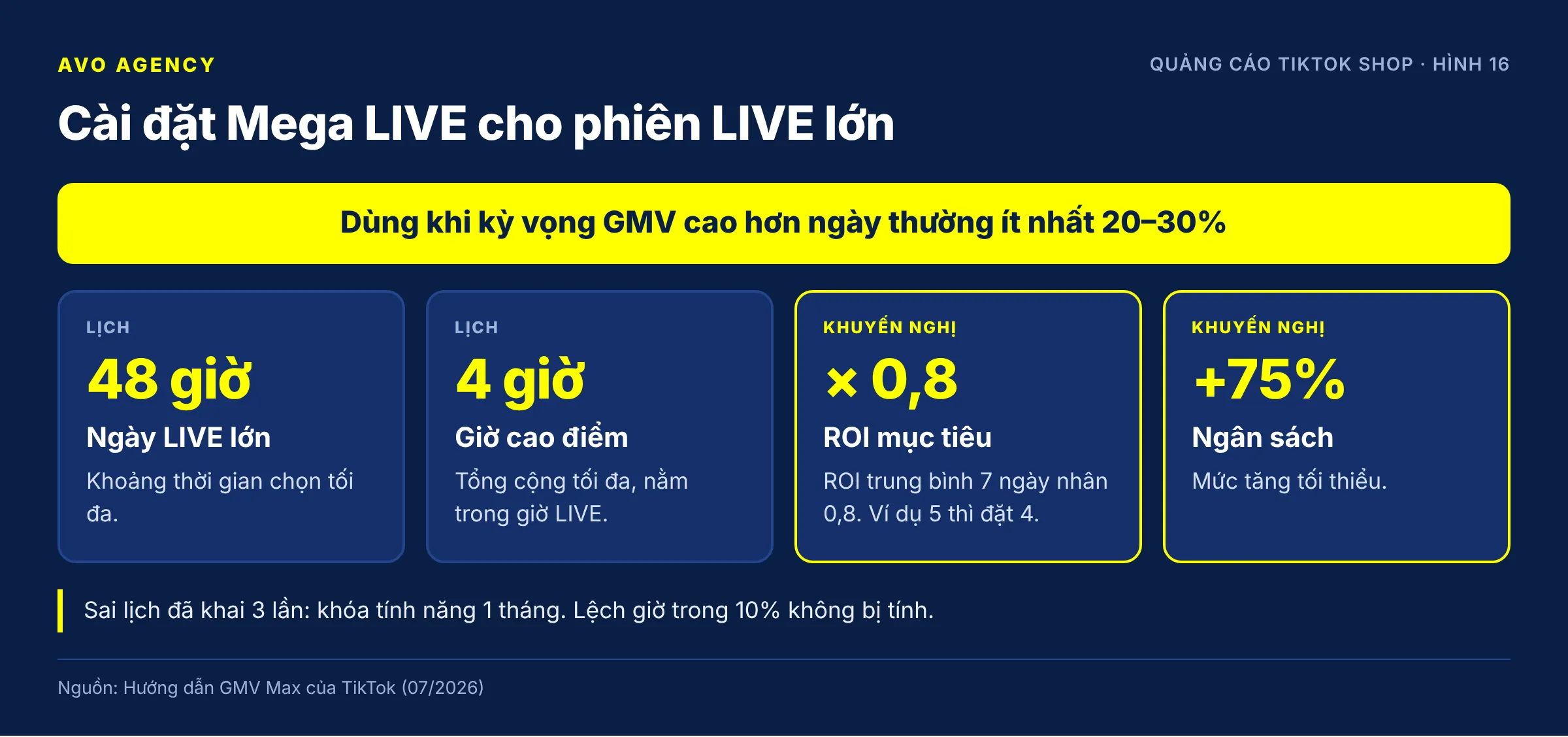
Figure 16: Mega LIVE settings and the schedule compliance rules.
Steps:
- Create or open a LIVE GMV Max campaign, scroll down to Advanced optimization and turn on Mega LIVE.
- Choose the big LIVE date. The period can be up to 48 hours.
- Declare all your LIVE hours for the day and the peak hours. Peak hours total no more than 4 hours and must fall within the LIVE hours.
- Choose the setup type:
| Initial setup | Recommended setup | |
|---|---|---|
| Target ROI | Keep the campaign’s | 7-day average ROI × 0.8 (for example 5 becomes 4) |
| Budget | Keep the campaign’s | Raise by at least 75% |
| Benefits | Better budget allocation at peak hours | 20% extra free ad impressions, personalized vouchers, Mega LIVE badge |
- Click Save.
Two things to remember:
- You must go LIVE on the declared schedule. Turning off the Mega LIVE campaign during the day or missing the schedule 3 times locks the shop out of this feature for 1 month. Deviations within 10% of the time do not count.
- ROI Protection still applies based on the Mega LIVE target ROI, provided you do not change the ROI yourself during the day.
If a Mega LIVE day overlaps with Promotion Day, the Mega LIVE ROI and budget settings take priority.
Sources: Complete GMV Max – TikTok Shop Ads guide, Mega LIVE section (TikTok, updated July 2026)
Part 5. Sale days, coupons and measurement
17. How should I adjust GMV Max ads for big sale days (10.10, 11.11, 12.12)?
Short answer: Before a big sale day, turn on GMV Max’s Promotion Day mode so the system lowers the target ROI by 10% and raises the budget by 50% on exactly those days. If you adjust by hand, TikTok suggests lowering ROI to 0.8–0.9 times and raising the budget 2–3 times. Changes applied automatically by Promotion Day do not cancel ROI Protection; manual changes do.
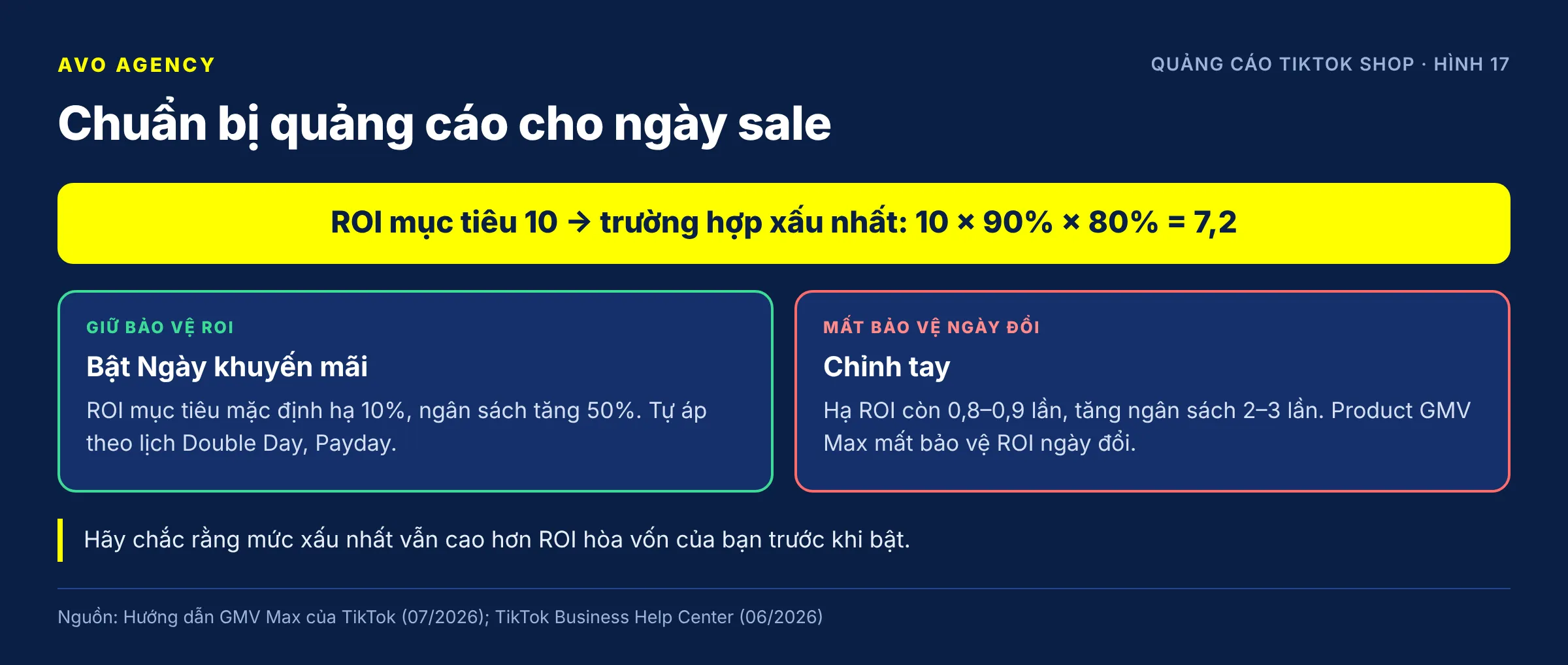
Figure 17: Two ways to prepare ads for sale days and their effect on ROI Protection.
| Promotion Day on | Manual adjustment | |
|---|---|---|
| Target ROI | Lowered by 10% by default, deeper cuts selectable | Lowered to 0.8–0.9 times |
| Budget | Raised by 50% by default, adjustable | Raised 2–3 times |
| Schedule | Follows Double Day and Payday events automatically; custom date ranges can be added | You have to act on the right days |
| ROI Protection | Kept, calculated on the Promotion Day ROI | Lost on the day you change ROI (Product GMV Max) |
How to turn it on: when creating or editing a campaign, find Promotion Day mode and turn it on. Click View details to see which sale events apply, and untick the ones you are not joining.
Understand the ROI you might actually get: for example, target ROI 10, lowered to 9 on Promotion Day. Because achieved ROI varies between 80–120%, the worst case according to TikTok is 10 × 90% × 80% = 7.2. Make sure 7.2 is still above your break-even before turning it on.
Extra options:
- Pre-Promotion Day: extends 3–4 days before the sale event with a lower ROI and a stronger budget, on a schedule set by TikTok. You can choose up to 10 videos to prioritize.
- TikTok’s sale-day budget split: 70% runs on the target ROI, 30% goes to Max Delivery during the 4–5 peak hours. Remember that Max Delivery cancels ROI Protection.
Field experience for small and medium shops (sales of about 200–500 million VND/month):
- If a sale event lasts several days and you spread money evenly across them, big brands and big KOLs take all the impressions. Concentrate on 1–2 days, 3 at most.
- Avoid the days big brands go LIVE and start earlier than them. For example, if they push hard on the 8th–9th, small shops push on the 4th–5th or 6th–7th.
- Put the budget on exactly the days and hours when your category has platform vouchers.
- 3–4 days before the sale: lower ROI by no more than 10%, raise the base budget by about 50%, and turn on Promotion Day for exactly the days you chose.
- Keep the campaign running continuously. Only raise the budget on your focus days.
Sources: Complete GMV Max – TikTok Shop Ads guide, Promotional Day and Pre-Promotion Day sections (TikTok, updated July 2026); TikTok Business Help Center – About ROI protection for GMV Max campaigns (June 2026); TikTok Shop workshop, 11 September 2026 (field experience)
18. What is GMV Max Coupon? Should I turn it on?
Short answer: GMV Max Coupon lets the system hand out discount codes automatically to shoppers who are hesitating, instead of discounting for everyone. You pay a fixed rate on the whole campaign’s net revenue, 3% by default and 1–50% allowed, no matter how many codes are used, and it is non-refundable. Try it at a low rate once ROI is stable but GMV has stalled.
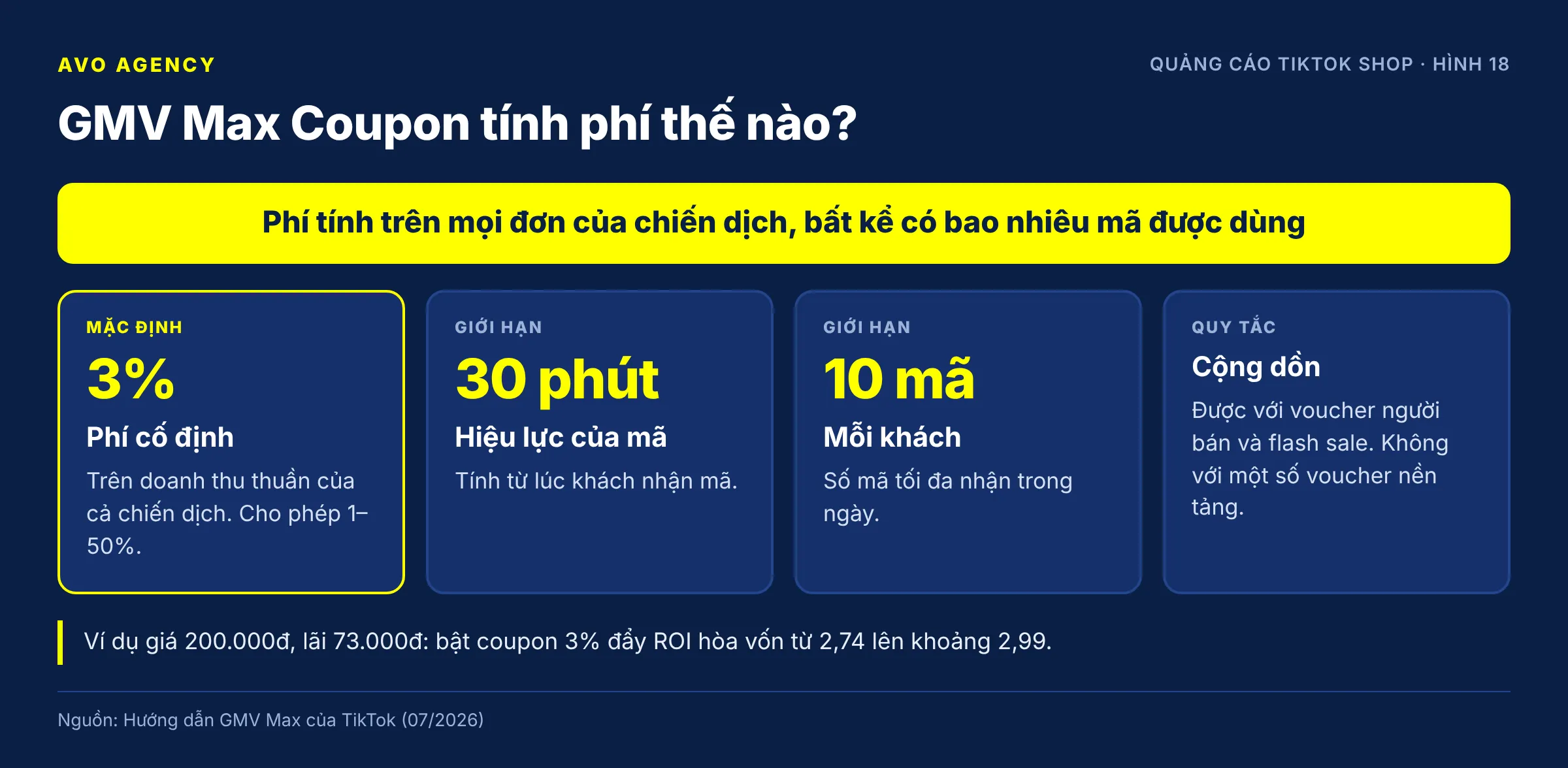
Figure 18: How the GMV Max Coupon fee is calculated and its limits.
How it works:
| Item | Detail |
|---|---|
| Fee | A fixed rate on the net revenue of the whole campaign, not only orders that use a code |
| Rate | 3% by default; 1–50% allowed; TikTok suggests 3–10% depending on category |
| Who gets codes | Shoppers the system predicts will buy with an extra incentive; shoppers who would buy anyway do not get one |
| Code validity | 30 minutes after it is received; up to 10 codes per shopper per day |
| Stacking | Works with seller vouchers and flash sales; not with some platform vouchers |
| List price | Unchanged, because codes are issued as a platform subsidy |
| LIVE GMV Max | Only the official account can turn it on |
| Subsidy | TikTok covers up to 60% of the seller’s coupon cost (per the GMV Max Pro material) |
Requirement: the GMV Max ad account needs “Net Sales Access” permission. If an agency operates the account, the shop owner must approve this permission. The feature is in testing in Southeast Asia, so some accounts do not see it yet.
Factoring it into break-even (AVO’s view): the coupon fee is a new cost on every order. With our example of a 200,000 VND price and 73,000 VND pre-ad profit, turning on a 3% coupon costs an extra 6,000 VND/order:
Break-even ROI with a 3% coupon = 200,000 ÷ (73,000 − 6,000) ≈ 2.99
A coupon only pays off when the extra GMV covers this cost. According to TikTok, early tests showed GMV up 8–9%. Track its effect in the Coupon cost and Coupon revenue columns of the campaign report; per-order details are in Seller Center > Finance > Transactions.
Field experience: Start at 1% and only raise it once you see results. If your shop is discounting heavily with seller vouchers, you can move part of that to the coupon: instead of 50,000 VND off for every shopper, give 20,000–25,000 VND off by voucher and let a 1–2% coupon hand out the rest to shoppers who need it. One speaker said a 1% coupon raised their account’s revenue by about 10%, but that is one account’s figure and the same speaker gave two different numbers in the same session, so do not treat it as an expectation.
Sources: Complete GMV Max – TikTok Shop Ads guide, GMV Max Coupon section (TikTok, updated July 2026); GMV Max Pro – TikTok product material (updated August 2026); TikTok Shop workshop, 11 September 2026 (field experience)
19. What is GMV Max Pro? Does it cost extra?
Short answer: GMV Max Pro is GMV Max plus three tools: GMV Max Coupon, Affiliate Cost Optimization and Commission Savings. TikTok says using GMV Max Pro costs nothing extra and it does not replace GMV Max; the two exist side by side. Different accounts may see different numbers of tools, because each tool is rolled out on its own schedule.
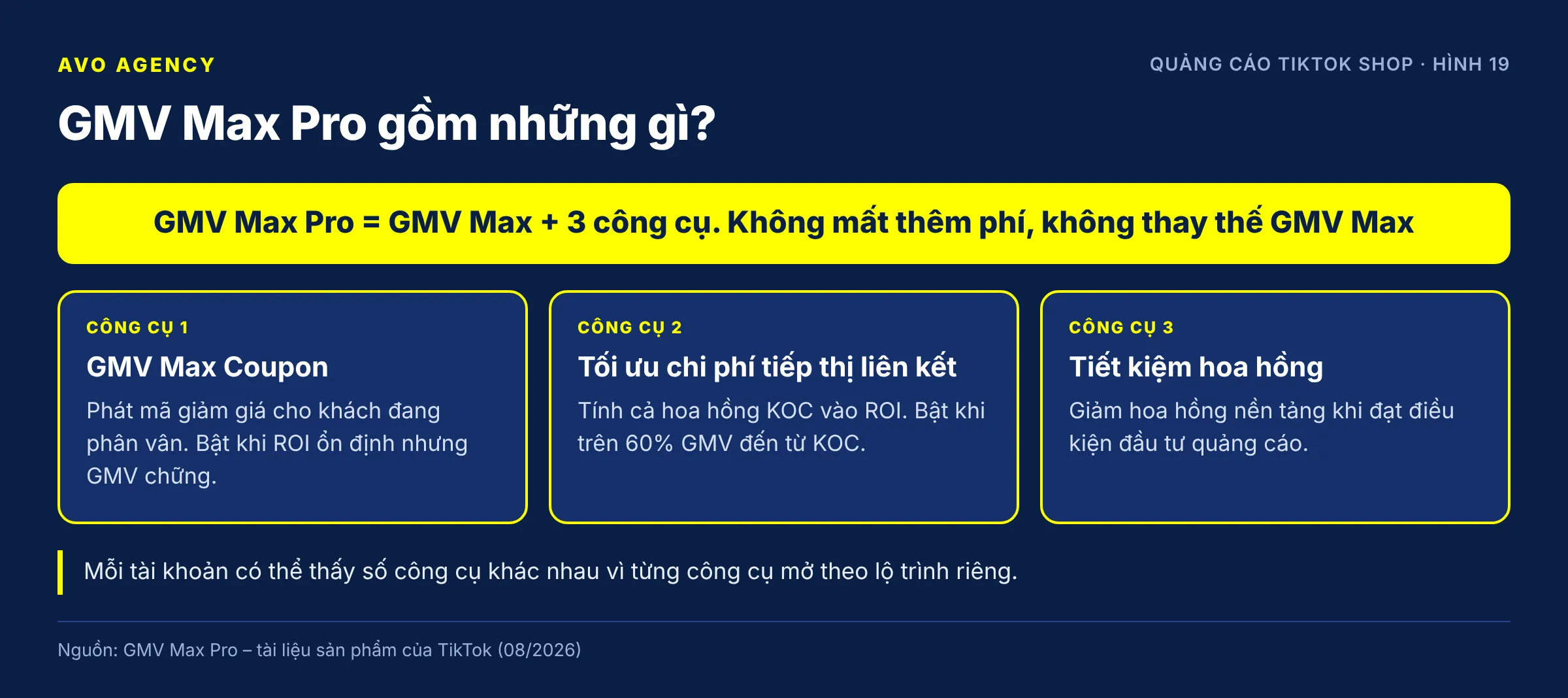
Figure 19: GMV Max Pro is GMV Max plus three additional tools.
| Tool | What it does | Turn it on when | Status (per August 2026 material) |
|---|---|---|---|
| GMV Max Coupon | Hands out discount codes to hesitant shoppers | ROI is stable but GMV has stalled | Testing in Southeast Asia and the US |
| Affiliate Cost Optimization | Optimizes on ROI including KOC commission | Over 60% of GMV comes from KOCs and margins are squeezed; you want more of your own videos in the mix | Early testing |
| Commission Savings | Lowers the platform commission when the shop meets an ad investment condition | Margins are thin and you want more money for ads | Officially launched in Southeast Asia |
Two ways to calculate ROI in GMV Max Pro:
Ad ROI                  = GMV ÷ Ad cost
Ad and affiliate ROI    = GMV ÷ (Ad cost + KOC commission)
With the second option, the system ranks videos by profit after commission. As practitioners understand it, KOC videos with above-average commission get lower priority. If you do not want that kind of allocation, go back to the standard ad ROI.
About Commission Savings in Southeast Asia: it comes in two forms. The campaign-level form asks you to accept a lower target ROI and a minimum budget threshold, in return for reduced commission on the campaign’s orders, effective for at least 14 days if you do not change the products. The shop-level form applies when ad spend reaches a certain share of revenue. The exact conditions are shown on the GMV Max Pro home page of each account.
How to evaluate several tools turned on at once: TikTok advises looking at each tool through its own metrics while also watching overall GMV and profit, rather than attributing every change to a single feature.
AVO’s view: If you ask what to turn on first, we would turn tools on one at a time, at least one to two weeks apart. Turn on all three at once and when the numbers move you will not know why. Commission Savings in particular usually comes with a requirement to lower the target ROI, so recalculate break-even before accepting it.
Sources: GMV Max Pro – TikTok product material (updated August 2026); TikTok for Business – GMV Max: Your TikTok Shop growth engine (13 May 2026); TikTok Shop workshop, 11 September 2026 (field experience)
20. How do I know whether GMV Max ads are really bringing in extra revenue?
Short answer: To know whether GMV Max is bringing in extra revenue, compare the total non-LIVE GMV of the advertised products before and after running ads, taken from Data Compass in Seller Center. Do not look only at the ROI on the ad dashboard, because that ROI already includes organic orders. And do not compare GMV Max ROI with the old ads’ ROAS, because the two metrics attribute orders differently.
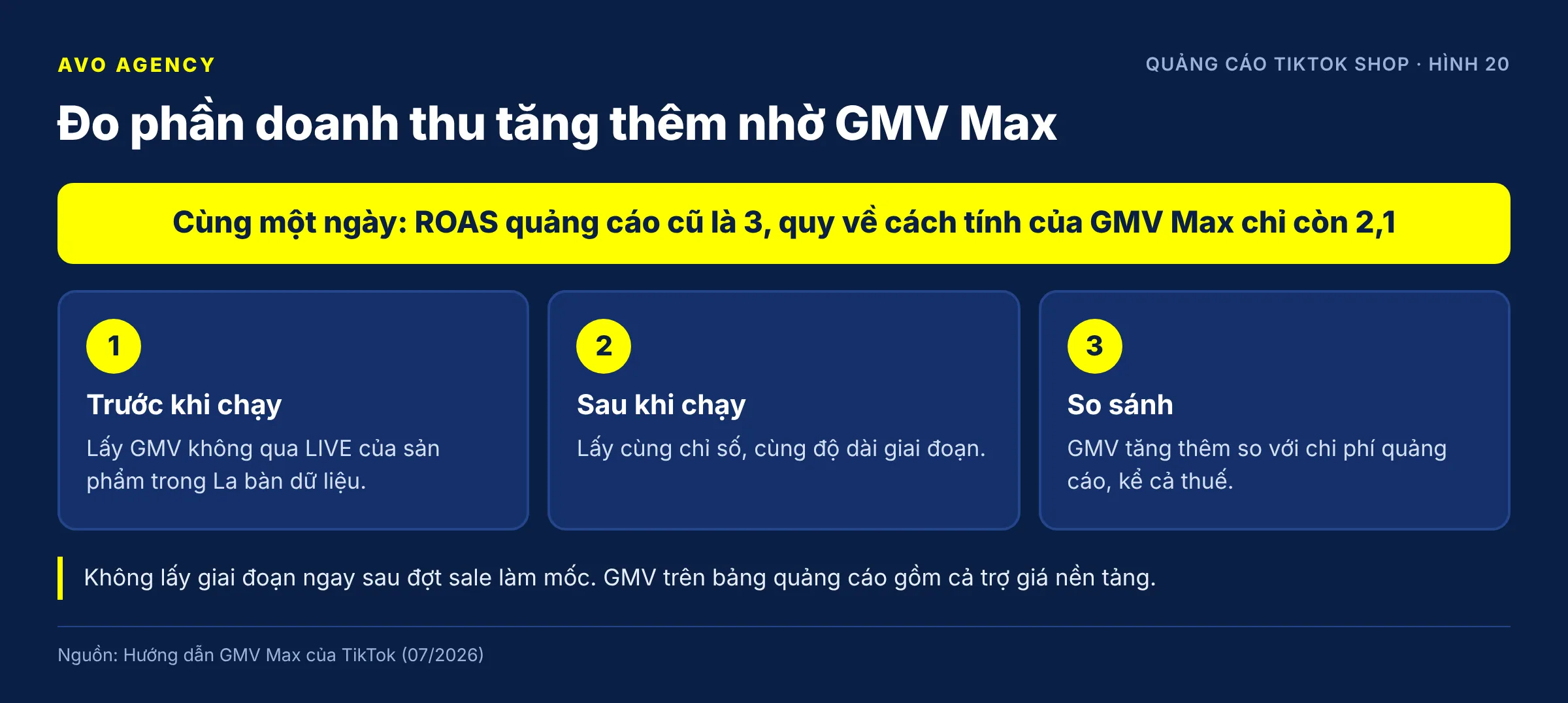
Figure 20: How to measure the extra revenue from GMV Max ads.
How to do it:
- Go to Seller Center > Data Compass > Products.
- Show the GMV and LIVE GMV columns for the products you advertise. Non-LIVE GMV = GMV − LIVE GMV.
- Take the figures for a period before running ads and a period after, of equal length.
- The extra GMV compared with the ad cost (including tax, see question 4) tells you whether the ads are worth the money.
Three notes to avoid misreading:
- GMV in Data Compass is lower than GMV on the ad dashboard, because the ad dashboard includes platform subsidies. This is not a data error.
- Do not use the period right after a sale event as the baseline. Organic GMV naturally drops after a sale, which can wrongly lead you to conclude the ads are weak.
- The ad dashboard works on GMV, before cancelled and returned orders are deducted. Real profit must be calculated on successfully delivered orders.
Why not compare ROI with the old ROAS: in TikTok’s example for the same day, the old ads spent 100 USD with a displayed ROAS of 3. Recalculated the GMV Max way (total non-LIVE GMV of the advertised products ÷ cost), the figure is only 2.1. Meanwhile, a Product GMV Max campaign spending 150 USD reached an ROI of 3. ROAS 3 and ROI 3 look equal, but on the same basis it is 2.1 versus 3.
If you see no extra GMV, TikTok points to two common causes: the target ROI is set above the recommended level, or the budget is too low.
AVO’s view: The right question is not “what is the ROI” but “after running ads, did this product’s total profit go up or down”. We track three numbers per product each week: non-LIVE GMV, ad cost including tax, and the profit left after all costs.
Sources: Complete GMV Max – TikTok Shop Ads guide, section on evaluating and comparing Product GMV Max with PSA/VSA (TikTok, updated July 2026); TikTok Business Help Center – About attribution for GMV Max (June 2026)
Common terms when running TikTok Shop ads
- GMV Max: the TikTok Shop ad campaign type that optimizes automatically for total revenue, based on the target ROI and budget the seller sets.
- Product GMV Max (PGM): GMV Max that advertises products through videos.
- LIVE GMV Max (LGM): GMV Max that advertises LIVE sessions, delivering only while broadcasting.
- ROI (in GMV Max): total GMV of the products in the campaign divided by ad cost.
- Break-even ROI: the ROI at which profit is zero, equal to the price divided by the pre-ad profit.
- ROI Protection: the policy of refunding ad credit when actual ROI is below 90% of target and the campaign qualifies.
- Ad credit: TikTok advertising credit refunded to the ad account, used to keep running ads.
- Creative Boost: a separate budget to push selected videos, with no ROI guarantee.
- Max Delivery: a mode that spends the whole budget without an ROI constraint.
- Promotion Day: a mode that automatically lowers the target ROI and raises the budget during sale events.
- VSA, PSA, LSA: the three old TikTok Shop ad formats (video, product, LIVE), which cannot be created since July 2025.
- Business Center (BC): where the shop, ad accounts, TikTok accounts and users are managed together.
- Bulk authorization: a KOC setting that lets the shop use every video linked to its products to run ads.
- Non-LIVE GMV: a product’s total GMV minus the GMV generated in LIVE sessions.
About AVO Agency
AVO Agency runs TikTok Shop and GMV Max advertising for sellers in Vietnam. The content on this page has been checked against official TikTok documents; the parts marked “AVO’s view” describe how our team operates, and the parts marked “Field experience” are practitioners’ observations, not platform rules.
Consolidated references
- TikTok Business Help Center – About GMV Max migration for TikTok Shop Ads (March 2026)
- TikTok Business Help Center – GMV Max guidelines (Vietnamese) (June 2026)
- TikTok Business Help Center – About Product GMV Max (January 2026)
- TikTok Business Help Center – About attribution for GMV Max (June 2026)
- TikTok Business Help Center – Best practices for Product GMV Max (June 2026)
- TikTok Business Help Center – About ROI recommendation for GMV Max campaigns (March 2026)
- TikTok Business Help Center – About ROI protection for GMV Max campaigns (June 2026)
- TikTok Business Help Center – Troubleshoot your LIVE GMV Max campaign (March 2026)
- TikTok Business Help Center – Vietnam: About Value Added Tax (July 2025)
- TikTok Shop Seller Academy – Seller fees (Vietnamese) (4 August 2026)
- TikTok for Business – GMV Max: Your TikTok Shop growth engine (13 May 2026)
- TikTok – Complete GMV Max – TikTok Shop Ads guide (official partner material, updated July 2026)
- TikTok – GMV Max Pro product material (official partner material, updated August 2026)
- TikTok Shop workshop “Ad optimization formula – Breaking through GMV with Creative Boost 2.0” (“Công thức tối ưu quảng cáo – Bứt phá GMV với Creative Boost 2.0”), 11 September 2026 (speakers’ experience, not official material)
This page is for reference only and is not legal or tax advice. TikTok’s advertising policies and features change often; check your own Seller Center and TikTok Ads Manager before applying anything.
Stuck on something that is not on this list?
Call or message AVO on Zalo and you reach the person in charge. This website collects no information about you.