
FAQ
TikTok Shop FAQ for new sellers: Common questions about selling on TikTok Shop
Quick answers for new TikTok Shop sellers in Vietnam: registration papers, 2026 platform fees, tax, payouts, listings, shipping, returns, violation points, promotions and GMV Max ads.
Author: AVO Agency · Last Updated: 26/09/2026 · Scope: TikTok Shop Vietnam
Summary: Key Numbers to Remember
| Item | Figure | Effective Date / Source |
|---|---|---|
| Transaction fee per successful delivery | 6% | 09/05/2026 · TikTok Shop |
| Order processing fee | 3.000đ/order | 27/10/2025 · TikTok Shop |
| Platform tax withholding for goods (individuals, household businesses) | 1% VAT + 0,5% PIT | 01/07/2025 · Nghị định 117/2025/NĐ-CP (Decree 117/2025/ND-CP) |
| Non-taxable revenue threshold for household and individual businesses | 500 million VND/year | 01/07/2026 · Amended PIT Law |
| Settlement time to Balance (standard settlement) | 7 days after successful delivery | TikTok Shop |
| Automatic withdrawal | Every Wednesday | TikTok Shop |
| Handover deadline for orders placed before 18:00 | 23:59 on the same working day | FDR Policy |
| Target Fast Dispatch Rate (FDR) | Over 95% | TikTok Shop |
| Maximum Seller-Fault Cancellation Rate | 2,5% | TikTok Shop |
| Deadline for reviewing return requests / inspecting returned goods | 1 calendar day / 2 calendar days | TikTok Shop |
| Eligibility criteria for affiliate creators | ≥ 1.000 followers, ≥ 18 years old | TikTok Shop |
| Number of accounts linked to one shop | 1 official + 4 marketing | TikTok Shop |
Section 1. Registration and Shop Setup
1. What are the requirements and documents needed to sell on TikTok Shop?
Short answer: To sell on TikTok Shop Vietnam, you need documents matching your registration type and a phone number or email address that hasn’t been used on the platform before. Individuals must use a 12-digit chipped Citizen ID or passport; Household Businesses require a Household Business Registration Certificate; and Enterprises must provide a Business Registration Certificate.
- Individual — Not registered as a business. Documents: 12-digit chipped ID card or passport. Verification is done via NFC scan on a smartphone.
- Household Business — An individual or household registered for business. Documents: Household Business Registration Certificate.
- Enterprise/Corporation — A legal entity separate from its owners. Documents: Business Registration Certificate.
Preparation Checklist Before Registering
- Unique phone number or email. Each phone number or email can only be linked to one TikTok Shop account per individual. To open a second shop, you must use different contact information.
- Clear, valid, color documents. Photos must show all four corners, be uncropped, unedited, and free of any watermarks, logos, or blurred backgrounds.
- NFC-enabled phone (For Individual accounts): Enable NFC, remove your phone case, place your ID card against the back of the device, and hold still until the scan is complete.
- Tax and Warehouse information. Prepare your tax details and warehouse address to complete the setup once your account is approved.
- Bank account. The account holder’s name must match the name of the shop owner (required for withdrawing funds).
⚠️ Common Rejection Reasons: Blurry or ineligible documents, missing information, data mismatching the documents, or incorrect addresses. If rejected, read the specific reason in the Seller Center, correct the issue, and resubmit.
Source: TikTok Shop Seller Academy – Seller Account Registration Process (Updated June 12, 2026).
2. Should I register my TikTok Shop as an Individual, Household Business, or Enterprise?
Short answer: New sellers planning to sell long-term should register as a Household Business. Individual accounts (which only require a chipped ID card) are best for those just testing the waters. Enterprise accounts are suitable for brands and shops that need to issue invoices. While you can upgrade from an Individual account to a Household Business or Enterprise later, the review process takes about 2 weeks, during which your withdrawals will be temporarily locked.
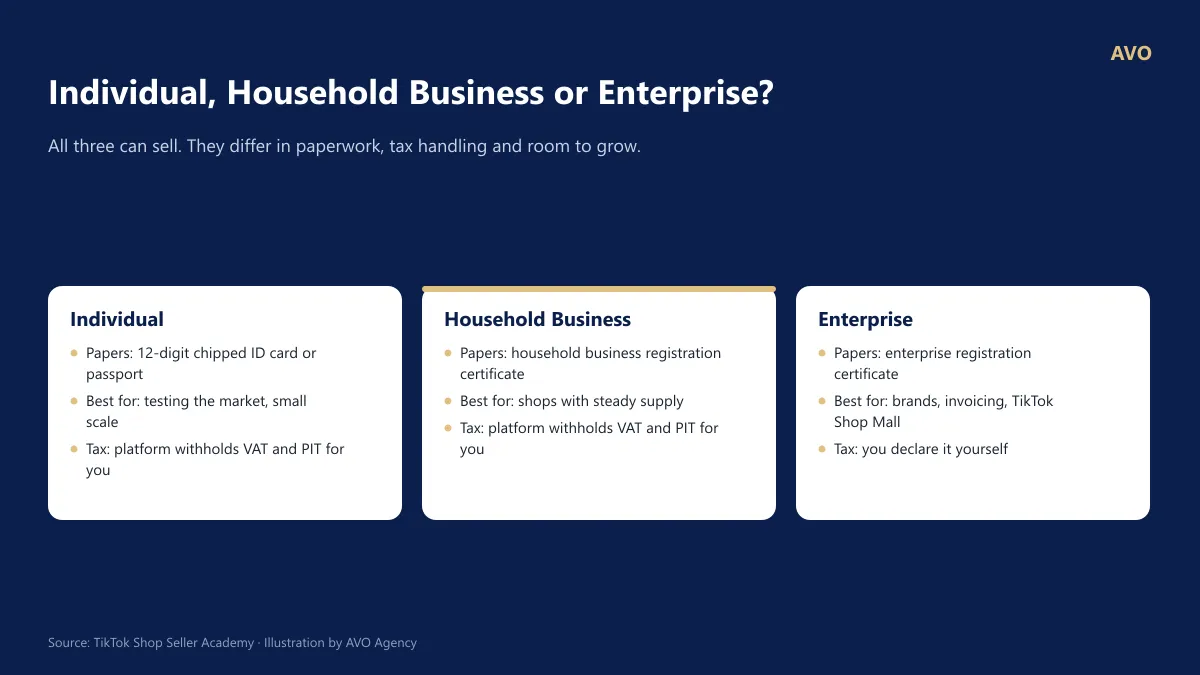
Figure 1: The three TikTok Shop Vietnam registration types and their required documentation.
| Registration Type | Required Documents | Best For |
|---|---|---|
| Individual | 12-digit chipped ID card or Passport | Testing the market, small scale |
| Household Business | Household Business Registration Certificate | Shops with stable supply sources |
| Enterprise | Enterprise Registration Certificate | Brands aiming for TikTok Shop Mall |
Key Considerations:
- You can change your registration type later via My Account > Account Settings > Qualification Center. However, you can only upgrade from Individual to Household Business/Enterprise (or switch between different Household Businesses/Enterprises); you cannot downgrade back to an Individual account.
- When transferring ownership, TikTok reviews the application for approximately 2 weeks. During this period, the withdrawal function is temporarily locked, the previous bank account is unlinked, and any brand or category certifications must be resubmitted. If you are committed to selling long-term, registering the correct type from the start will save you significant effort.
- For Individual and Household Business accounts, the platform automatically deducts and pays VAT and Personal Income Tax (PIT) on your behalf (see Question 7).
AVO’s take: Many sellers choose the Individual option because it’s faster, only to find they need to switch to a Household Business after a few successful months. This often leads to their funds being locked right when sales are peaking. If you plan to run serious ads, we recommend registering as a Household Business before opening your shop.
Source: TikTok Shop Seller Academy – Seller Registration Process (12/06/2026); TikTok Shop Seller Academy – Shop Ownership Change Process (09/07/2026)
3. What is the registration process for selling on TikTok Shop?
Short answer: Registering for TikTok Shop Vietnam involves 5 steps: (1) Create an account on the Seller Center using a TikTok account, phone number, or email; (2) Verify your identity using a chip-based Citizen ID card via NFC or a business license; (3) Provide tax, warehouse, and banking information; (4) Upload products; (5) Link an official TikTok account.
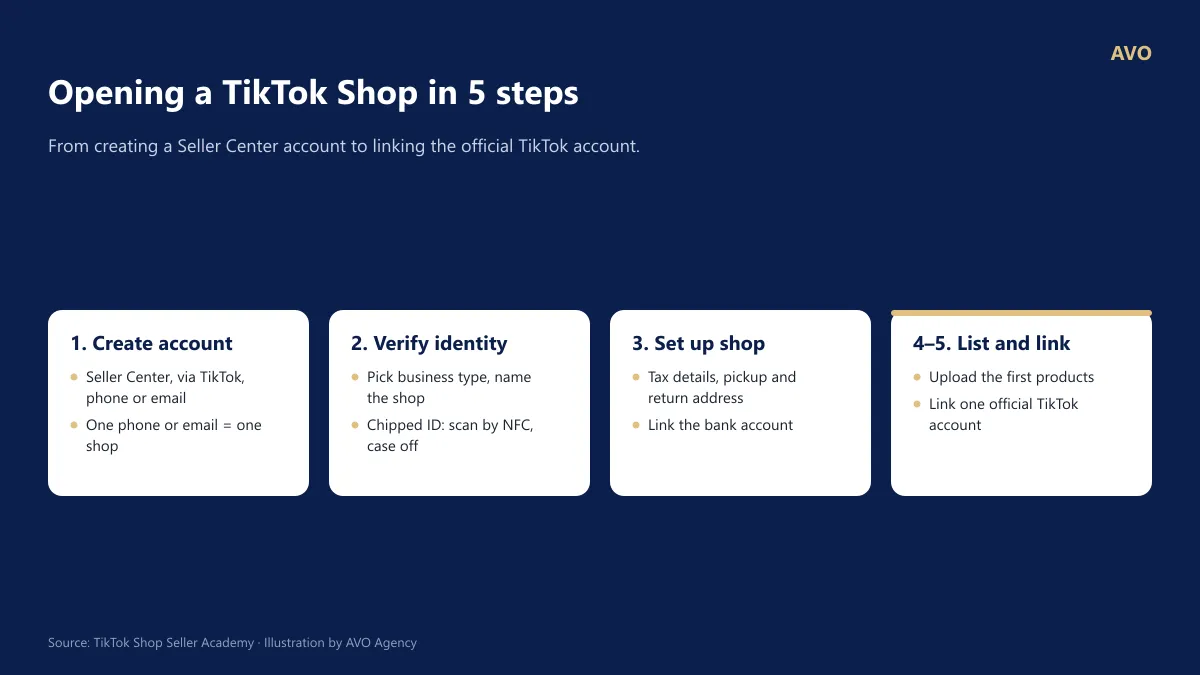
Figure 2: The 5-step process to open a shop on TikTok Shop Vietnam.
Detailed Instructions:
- Create an account: Visit the TikTok Shop Vietnam Seller Center. You can log in using your TikTok account (by scanning a QR code) or with a phone number/email and an OTP code. Each phone number or email can only be used for one shop.
- Verify your identity: Select your business type, set a shop name, fill in your contact information, and upload the required documents. If using a chip-based Citizen ID card (CCCD):
- Enable NFC (Android: Settings > Connections > NFC; most modern iPhones have this enabled by default).
- Remove your phone case.
- Place the ID card against the back of your phone, near the top or middle, and hold it steady until the scan is complete. If it doesn’t scan, move the card very slowly around the back of the phone.
- Set up your shop: Follow the task list in the Seller Center: provide tax information, set pickup and return warehouse addresses (these can be different), and link your bank account.
- Upload products: Once your documents are approved, upload your products so they can appear on the TikTok app (see question 9).
- Link an official account: Choose one TikTok account to serve as the official face of your shop (see question 4).
If you encounter difficulties at any step, click the Help button in the top right corner of the Seller Center to submit a support ticket.
Source: TikTok Shop Seller Academy – Seller Registration Process (12/06/2026)
4. What should I do if my TikTok Shop registration is rejected?
Short answer: If your TikTok Shop application is rejected, check the specific reason provided in the Seller Center, fix the errors, and resubmit. According to TikTok Shop, common causes for rejection include unclear or ineligible documents, missing information, or incorrect addresses. Document photos must be original, in color, show all four corners, and be currently valid.
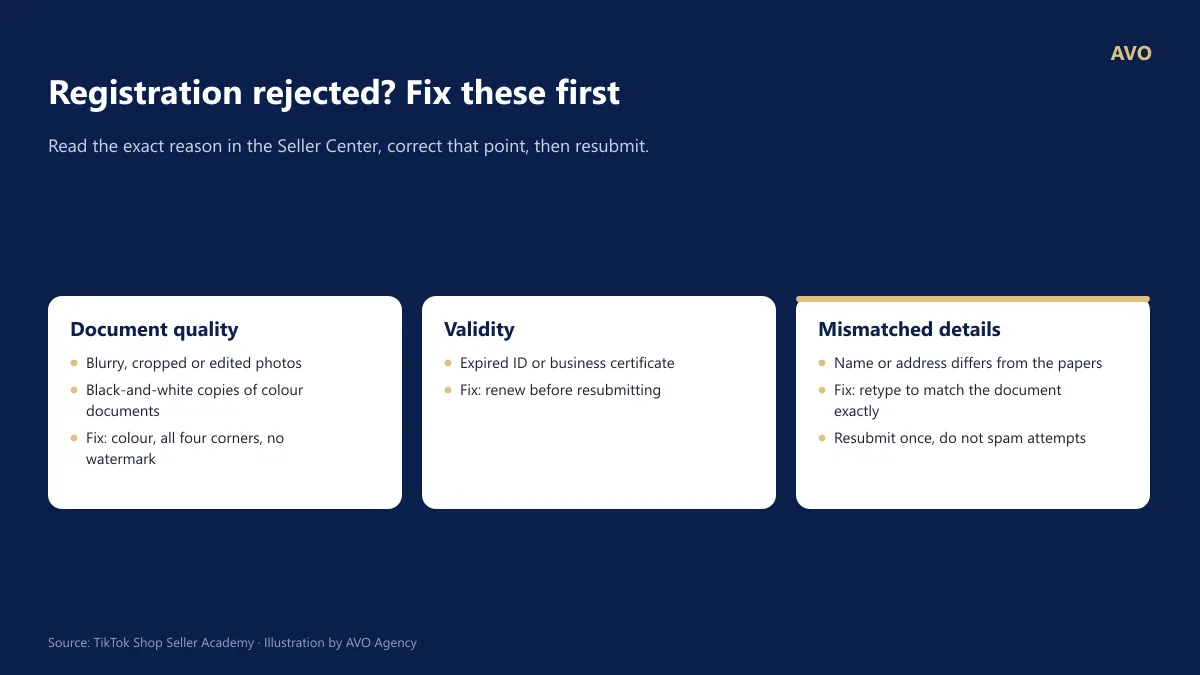
Figure 3: Common errors during TikTok Shop registration and how to fix them.
Common reasons for rejection according to TikTok Shop: Unclear or ineligible documents, incomplete information, or incorrect details/addresses.
Checklist before resubmitting:
- Original color photos: Use photos of the original documents; black and white photocopies will be rejected.
- Full visibility: Ensure all four corners of the document are visible. The image should not be cropped or have any glare.
- No edits: Photos must not contain logos, watermarks, or any digital alterations.
- Validity: Documents must be unexpired, not torn, and not deformed.
- Exact matching: The name and address entered in the Seller Center must match your documents character-for-character.
- Detailed address: The warehouse address must be specific, including the house number, street, and ward/commune.
If you entered the wrong phone number or email during registration, you will not receive an OTP within the usual one-minute window. In this case, simply go back, correct the information, and request a new code.
Source: * TikTok Shop Seller Academy – Seller Registration Process
5. What are the differences between an Official Account and a Marketing Account on TikTok Shop?
Short answer: Each TikTok Shop can link to 1 Official Account and up to 4 Marketing Accounts. The Official Account represents your brand—its name is synced with your shop’s name, and it can only be unlinked after 48 hours (limited to 3 times total). Marketing Accounts are secondary channels used for posting videos and hosting LIVE sessions, with a limit of 10 linking actions every 180 days.
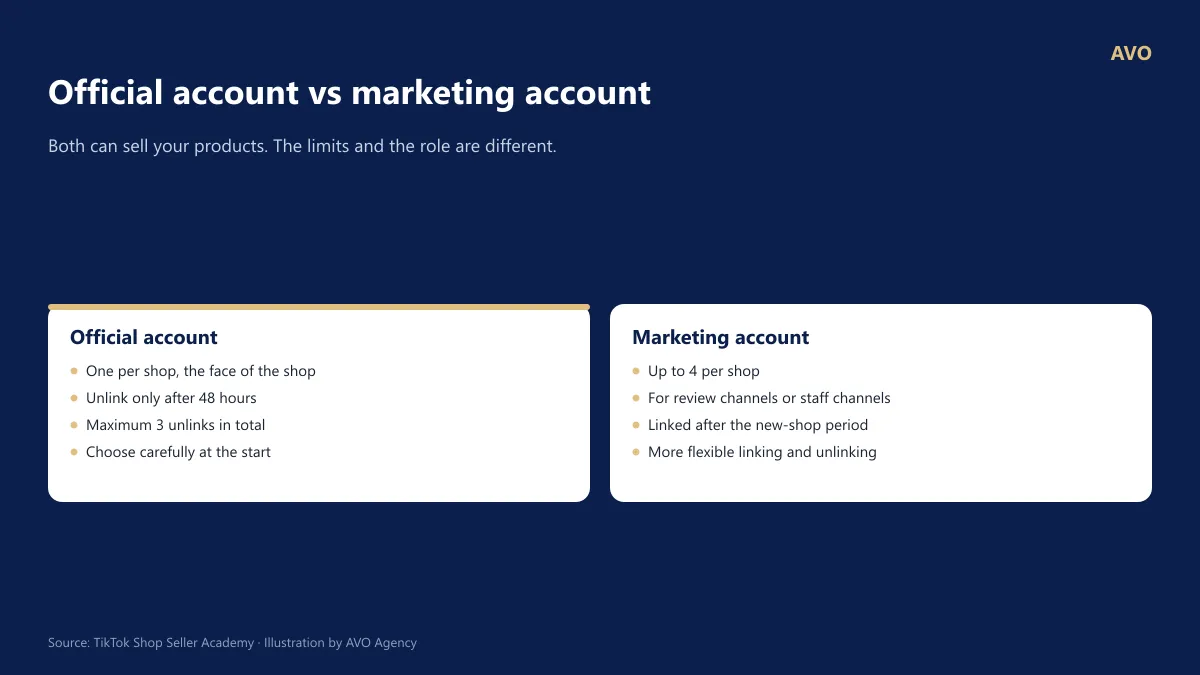
Figure 4: Limits for Official and Marketing accounts on TikTok Shop.
| Feature | Official Account | Marketing Account |
|---|---|---|
| Quantity | 1 account per shop | Up to 4 accounts per shop |
| Change Limits | Unlink after 48 hours; maximum 3 times total | Maximum 10 linking actions every 180 days |
| Key Characteristics | Account name is synced with the shop name; products automatically display on the shop tab | Linking invitations expire after 48 hours |
| New Shops | Can be linked immediately | Cannot be linked while the shop is in the “New Seller Probation Period” |
Best practices to get it right from the start:
- Choose your Official Account carefully: This should be your primary, long-term account with a name that matches your brand. Since you are only allowed to unlink it 3 times, once you hit the limit, you cannot change it again.
- Avoid account overlap: A single TikTok account cannot serve as the Official Account for two different shops. Additionally, an account cannot be both the Official Account and a Marketing Account for the same shop.
- Region matching: The region of the TikTok account must match the country where the shop is registered (Vietnam).
Source: TikTok Shop Seller Academy – Official TikTok Shop Account; TikTok Shop Seller Academy – Marketing TikTok Shop Account
6. Why are new TikTok Shop stores limited to 100 orders per day?
Short answer: New stores on TikTok Shop enter a Probation Period (Adjustment Period), starting at the Beginner level with a limit of 100 orders/day and 1,000 products. These limits automatically increase to 200 and 300, and are eventually removed entirely at the Professional level once the shop meets criteria regarding successful deliveries, shop ratings, violation points, and number of unique customers. You do not need to submit an application to lift these limits.
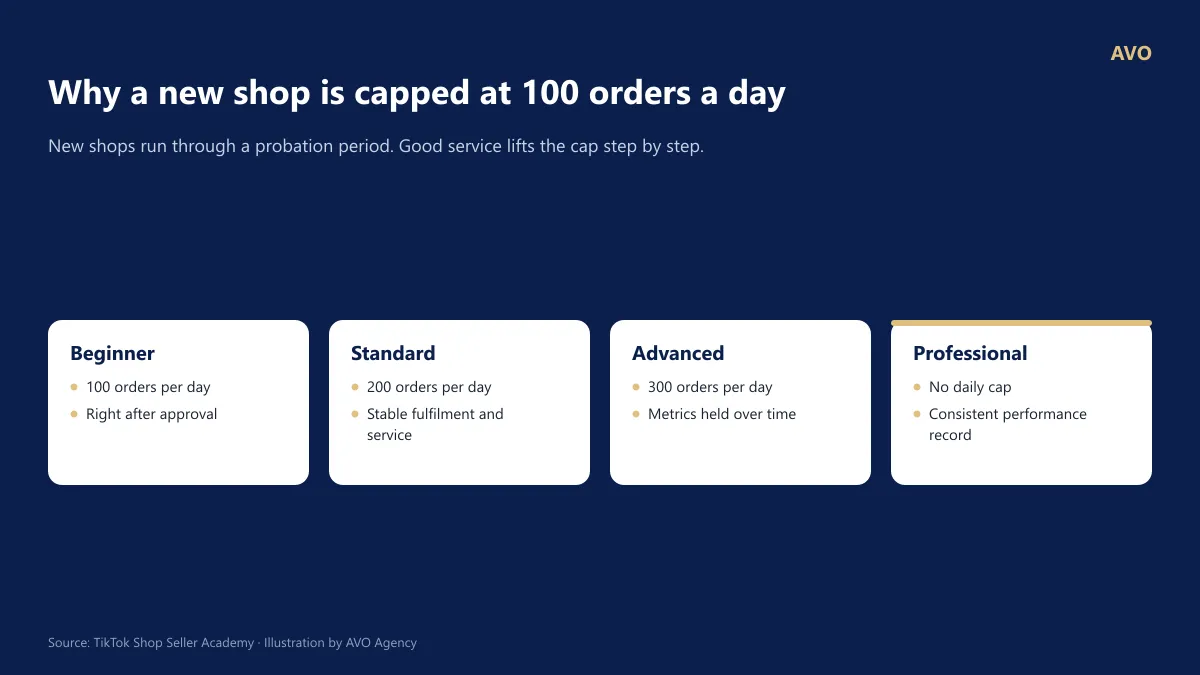
Figure 5: The 4 tiers of the TikTok Shop Probation Period and their daily order limits.
| Tier | Daily Order Limit | Product Limit |
|---|---|---|
| Beginner | 100 | 1,000 |
| Standard | 200 | 2,000 |
| Advanced | 300 | 3,000 |
| Professional | Unlimited | Probation Period Completed |
How to level up quickly: Criteria are based on the number of successful deliveries, shop rating, violation points, and number of unique customers. Shops can “skip” tiers if they immediately meet the criteria for a higher level. You can track your current status in the “Probation Period” widget on the Seller Center homepage.
What you need to do:
- Ship orders on time and avoid seller-fault cancellations (see Question 12).
- Inspect goods thoroughly before shipping to maintain high shop ratings.
- Read the policies carefully to avoid any violations during the first 30 days.
- Complete the Seller Certification test if prompted by the Seller Center.
AVO’s take: Do not scale your advertising aggressively while your shop is still capped at 100 orders/day. Any orders exceeding the limit will not be processed, but your ad spend will still be charged.
Source: TikTok Shop Seller Academy – New Shop Probation Period
Section 2: Fees, Taxes, and Cash Flow
7. What are the TikTok Shop selling fees in 2026?
Short answer: As of September 2026, TikTok Shop Vietnam sellers pay four main fees per successful order: Platform Commission (varies by category), a 6% Transaction Fee (effective May 9, 2026), an Order Handling Fee of 3,000 VND/order (effective October 27, 2025), and Shipping Fees if the actual parcel dimensions exceed the declared size. These fees are automatically deducted during settlement.
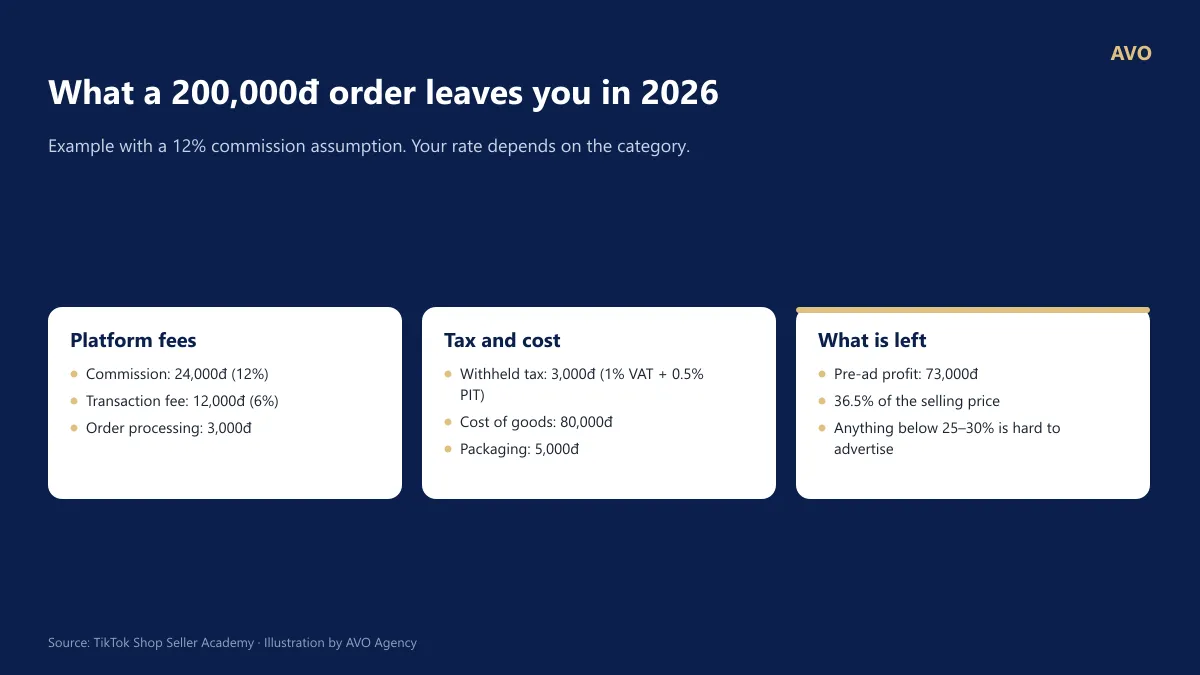
Figure 6: Illustrative example: A 200,000 VND order on TikTok Shop leaves 73,000 VND (36.5%) in pre-ad profit. A 12% commission rate is assumed.
| Fee Type | Rate | Notes |
|---|---|---|
| Platform Commission | Varies by Level 2 category; differs between Standard and Mall shops | Check the latest fee schedule in the “Seller Fees” article on Seller Academy |
| Transaction Fee | 6% (since May 9, 2026) | Applies to all sellers |
| Order Handling Fee | 3,000 VND/order delivered successfully (since Oct 27, 2025) | Non-refundable even if the order is later returned |
| Shipping Fee | Based on actual weight/dimensions | Only charged if the actual parcel exceeds the declared dimensions |
The fees above include tax. If you are a business entity with a verified Tax ID on TikTok Shop, the platform will only collect the pre-tax portion.
How to calculate for your products (Using the example in the image with a 200,000 VND selling price and an assumed 12% commission):
Selling Price 200,000 VND − Cost of Goods Sold (COGS) 80,000 VND − Platform Commission (12% × 200k) 24,000 VND − Transaction Fee (6% × 200k) 12,000 VND − Order Handling Fee 3,000 VND − Withholding Tax (1% + 0.5%) 3,000 VND − Packaging 5,000 VND = Pre-ad Profit 73,000 VND (36.5%)
AVO’s take: Run this calculation for every product before listing. If your pre-ad profit margin is below 25–30%, it will be very difficult to run ads, offer promotions, or pay KOC commissions while remaining profitable.
Source: TikTok Shop Seller Academy – Platform Commission (July 1, 2026); TikTok Shop Seller Academy – Order Handling Fee; Cong Thuong News – TikTok Shop continues to increase fees starting May 9
8. Does TikTok Shop withhold tax from sellers?
Short answer: Yes. Since 01/07/2025, under Law 56/2024/QH15 and Decree 117/2025/NĐ-CP, TikTok Shop withholds, declares and pays VAT and personal income tax (PIT) on behalf of Individual and Household Business sellers. Taxable revenue is the selling price minus any seller-funded discount. Tax withholding certificates can be downloaded from the Seller Center from 01/04/2026.
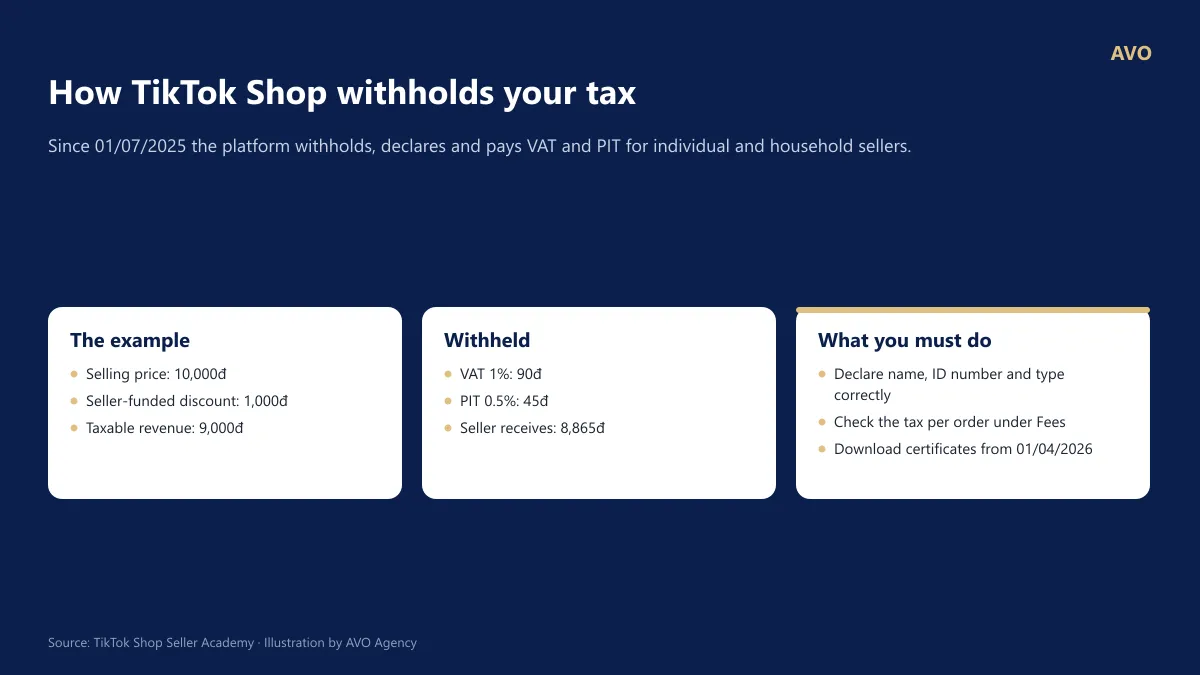
Figure 7: TikTok Shop’s own published example of VAT and PIT withholding.
How it is calculated: Taxable revenue is the amount you actually earn and the platform collects on your behalf, meaning the selling price minus the discount you fund yourself. In TikTok Shop’s example (price 10,000đ, discount 1,000đ, 1% VAT and 0.5% PIT), 90đ + 45đ is withheld. Your actual rate depends on your line of business.
What you need to do:
- Declare your full name, citizen ID number and business type correctly. If you declare them wrongly the platform still withholds the tax, and will not refund or compensate that amount.
- Check the tax withheld on each order under Fees in the payment details.
- From 01/04/2026, download withholding certificates under Finance > Tax documents > Tax withholding certificates.
- Any other tax obligations, and tax for the period before 01/07/2025, remain yours to handle. Enterprises declare their own tax under separate rules.
TikTok does not give tax advice. For a specific question, ask a tax adviser or the tax authority.
9. When will I get paid on TikTok Shop and how do I withdraw funds?
Short answer: Earnings are credited to your Seller Balance after an order is completed and settled. Sellers can withdraw funds manually once every 24 hours or set up automatic withdrawals every Wednesday. The minimum withdrawal is 1,000 VND and the maximum is 500,000,000 VND per transaction, with no fees. Funds usually reach your account within 4–5 business days.
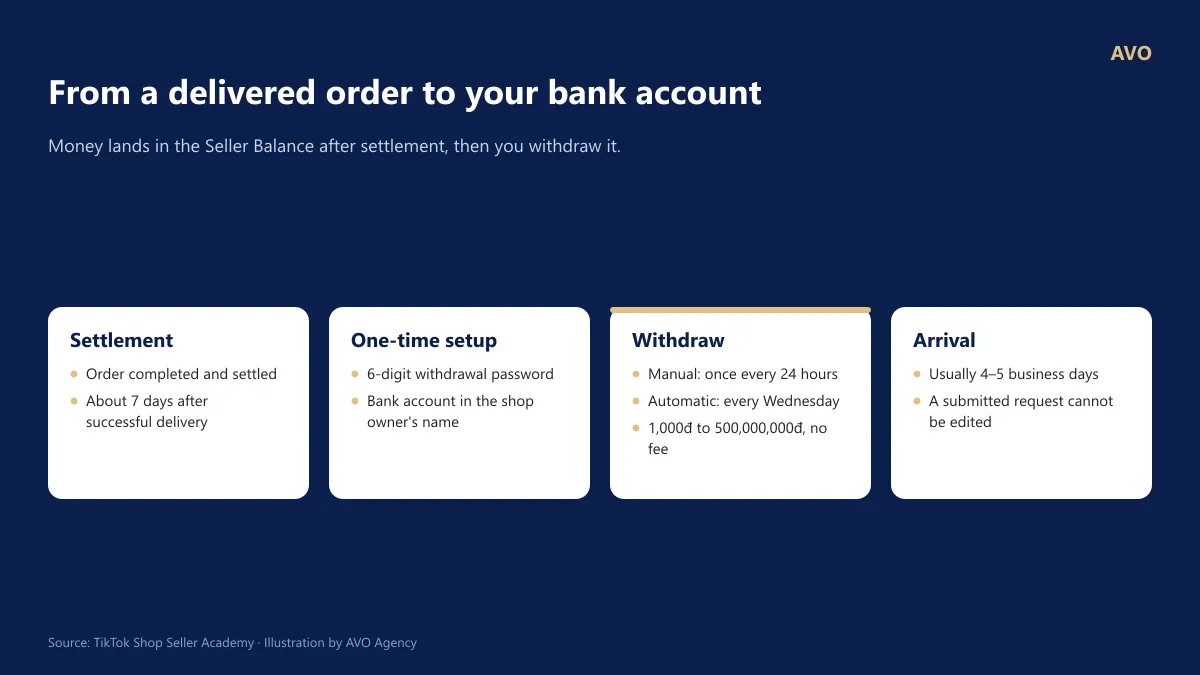
Figure 8: Cash flow from TikTok Shop orders to the seller’s bank account.
One-time Setup:
- Set a 6-digit withdrawal password.
- Link a bank account that matches the shop owner’s name.
Manual Withdrawal: Go to Finance > Withdraw > Withdraw, enter your 6-digit password, select your receiving account, and click Continue.
Automatic Withdrawal: Go to Finance > Withdraw > Auto-withdrawal settings, verify your primary bank account, and toggle the switch on. You can still perform manual withdrawals even when the automatic option is enabled.
| Manual | Automatic | |
|---|---|---|
| Frequency | Every 24 hours | Every Wednesday |
| Fee | Free | Free |
| Min / Max per transaction | 1,000đ / 500,000,000đ | 1,000đ / 500,000,000đ |
Once a withdrawal request is submitted, it cannot be canceled or edited. If the processing time has passed and the funds have not arrived, please submit a support ticket via Help Center > Ticket Log.
AVO’s take: Payouts often arrive slower than the time you need to pay for ads and restock inventory. Ensure you have enough working capital to cover at least 2–3 weeks of operations.
Source: TikTok Shop Seller Academy – How to withdraw funds from Seller Balance
Section 3. Products
10. How to list products on TikTok Shop for quick approval and high sales?
Short answer: Your products are more likely to be approved and recommended by the algorithm when they meet TikTok Shop’s data standards: a primary image with a white background (recommended 1280x1280px), main images with a 1:1 ratio (above 600x600px), at least 3 unique images, a product video, at least 5 attributes filled, a structured description with images, the correct product category, and accurate shipping dimensions.
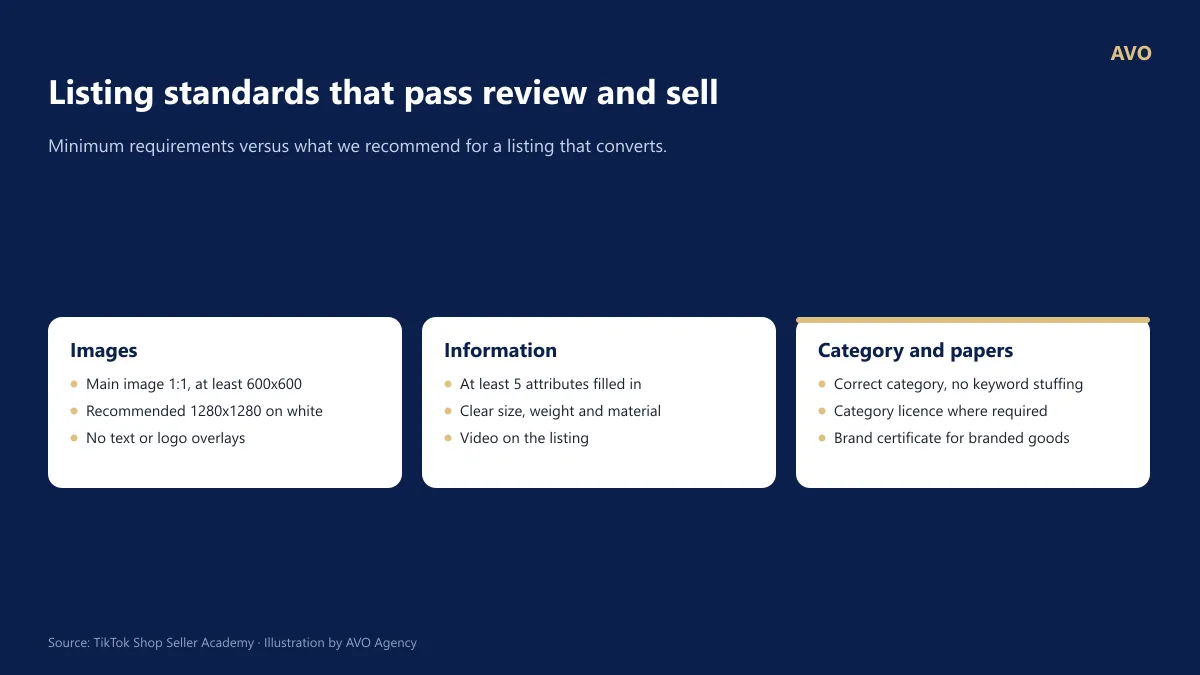
Figure 9: TikTok Shop product information quality standards: minimum vs. recommended levels.
Steps to list a product:
- Go to Products > Manage Products > Add New Product (or use the TikTok Seller Center app, which includes built-in image editing tools).
- Select the correct Category. Choosing the wrong category may lead to product rejection, and commission fees are also calculated based on the category.
- Format your Product Title using the formula: Brand + Product Name + Main Features + Specifications. Do not “stuff” keywords or use ALL CAPS.
- Upload Images: Use a white background for the primary image (1280x1280px recommended) without text overlays. Main images should be at a 1:1 ratio (above 600x600px) and must not contain Chinese characters (except for brand logos).
- Upload a Product Video.
- Fill in as many Attributes as possible (minimum of 5).
- Write a Structured Description: Divide the content into sections such as benefits, specifications, usage instructions, and storage tips, interspersed with images.
- Create Variations (SKUs) with specific images for each color/size. For fashion and footwear, a Size Chart is mandatory.
- Enter accurate Package Weight and Dimensions. If you understate these, you will be charged additional shipping fees.
- For categories requiring documentation (Cosmetics, Food, Mother & Baby, etc.), submit your Category/Brand Certificates beforehand.
After listing, use the Product Optimizer and Price Diagnostic tools in the Seller Center to see suggestions for further improvement.
Source: TikTok Shop Seller Academy – Shopping Center Business Strategy Guide (Product Information Standards); TikTok Shop Seller Academy – Product Management
11. Why do products get rejected or taken down on TikTok Shop?
Short answer: Products are usually rejected or removed for five reasons: misleading titles or images (clickbait), unfounded comparisons with other products, use of a brand you are not authorised to sell, phone numbers or links that pull buyers off the platform, and missing category certificates. The fix is to read the exact reason in Product Management, correct that specific point and resubmit for review.
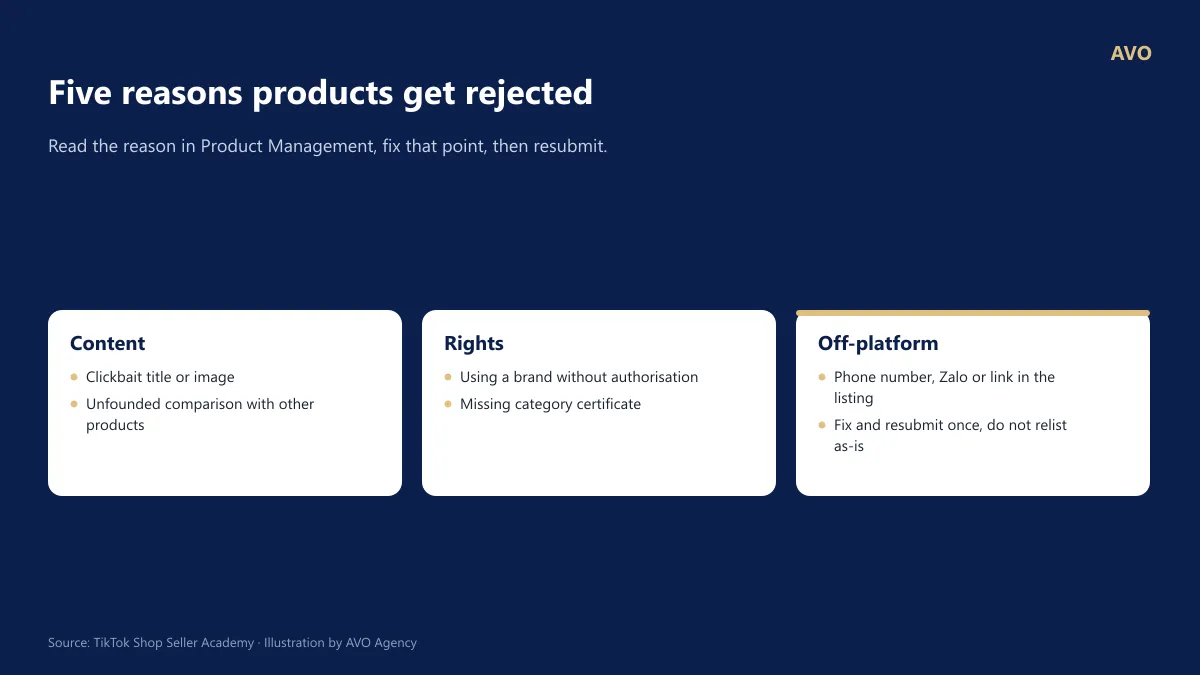
Figure 10: The 5 common violations that get products rejected on TikTok Shop.
How to fix it:
- Go to Product Management, filter for rejected or flagged products and read the specific reason.
- Correct exactly what was flagged:
- Clickbait: images and titles must match what the buyer actually receives (quantity, specification, price).
- Comparisons: remove claims comparing your product with others when you have no evidence for them.
- Trademarks: do not use a brand name or logo you are not authorised to use. For branded goods, register a brand certificate.
- Off-platform redirection: remove phone numbers, Zalo contacts and website links from images and descriptions.
- Missing certificates: submit the category licence before listing again.
- Resubmit for review. Do not repeatedly relist the same content unchanged, as that can add further violations.
12. How can I increase product visibility?
Short answer: TikTok Shop prioritizes products with high-quality listings (clear photos, 3+ unique images, product videos, and at least 5 attributes), competitive pricing, and strong shop performance (Late Shipment Rate ≤ 4%, Seller-Fault Cancellation Rate ≤ 2.5%). You should optimize these three pillars before running ads.
Product Optimization Checklist
- Main Photo: The product must be clearly visible on a white or light background, with no text overlays or cropping; the recommended resolution is 1280 × 1280 px.
- Images: Use more than 3 main images with no duplicates; ensure variation photos accurately match the color and size.
- Video: Include a product video.
- Attributes: Fill in at least 5 attributes; provide a size chart for apparel and footwear.
- Description: Break text into paragraphs and insert images; ensure there is no Chinese text.
- Tools: Use the Product Optimizer and Price Diagnostic tools in the Product tab to see specific suggestions for each SKU.
⚠️ Negative Rating Threshold: If a product has more than 40 reviews within a 60-day period and the 1–2 star rating rate exceeds the permitted threshold, enforcement actions will be applied. Address this at the root by improving product quality and providing accurate descriptions.
Source: Seller Academy – Business Strategy Guide for Mall Sellers (Listing quality criteria and operational metrics); Product Optimizer.
Section 4. Orders and After-sales Support
13. How do I process and deliver orders on TikTok Shop?
Short answer: When using TikTok Shipping (Platform Shipping), the carrier is automatically assigned by TikTok. Sellers should go to Orders > Manage Orders, open the To Ship tab, click Arrange Shipment, print the labels and packing lists, and hand them over to the courier or drop-off point within the required timeframe to avoid auto-cancellation or late shipment penalties.
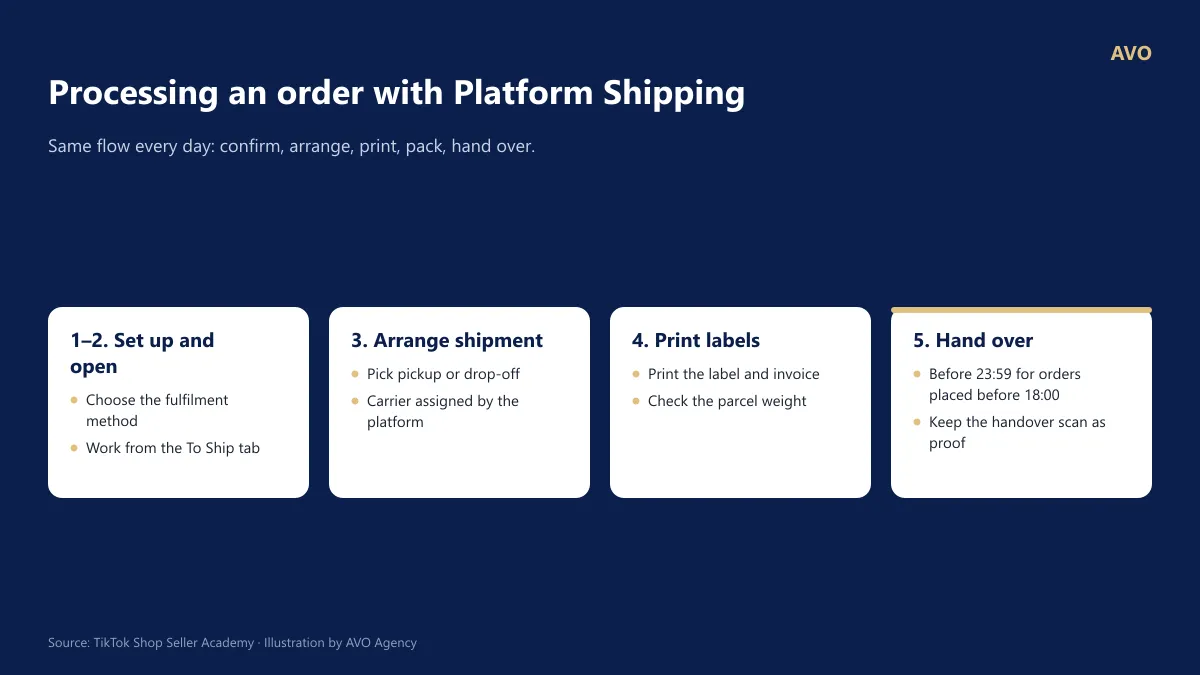
Figure 11: Order processing workflow for TikTok Shop using Platform Shipping.
Detailed steps:
- Initial Setup: Go to Fulfillment Settings and choose your default shipping method: Pick-up or Drop-off.
- Go to Orders > Manage Orders, open the To Ship tab, and filter by TikTok Shipping.
- Select the orders you want to process and click Arrange Shipment. The system will automatically generate the labels.
- Print both the shipping labels and packing lists. If a label fails to print correctly, you can regenerate it on the Shipping Labels page.
- Pack the items, attach the labels, and hand them over to the driver or drop them off at a service point.
- Ensure the order status updates to “Handed Over” within the deadline. If not, the order may be automatically cancelled or flagged as a late shipment.
Note: You cannot choose a specific carrier when using TikTok Shipping. If you experience issues with order pick-ups, you must file a logistics complaint within 7 days of arranging the shipment.
AVO’s Tip: Always record a video of the entire packing process, ensuring the tracking number is clearly visible. This is your strongest evidence if a customer files a dispute claiming missing or incorrect items.
Source: TikTok Shop Seller Academy – Full Guide to Platform Shipping (16/07/2026)
14. How fast must I ship an order to avoid a penalty?
Short answer: Under TikTok Shop’s Fast Dispatch Rate (FDR) rules, orders placed before 18:00 must be handed over and scanned before 23:59 the same working day; orders placed after 18:00 must be handed over before 11:59 the next working day. Working days run Monday to Saturday. The FDR target is above 95%.
Figure 14a. Handover windows for an order to count as fast dispatch (Sundays and public holidays are not working days)
95% Fast Dispatch Rate (FDR) ≤ 4% Late Dispatch Rate (orders that take 5 days or more to reach “shipped”) ≤ 2.5% Seller-fault cancellation rate (out of stock, wrong price, late dispatch)
Figure 14b. The three operating metrics to keep in range
How to protect these metrics
- Set a fixed packing cut-off each day, before the carrier arrives for pickup.
- Keep stock levels accurate; when an item runs out, switch it off instead of letting buyers order and then cancelling.
- During sale season, add packers and take parcels to the post office yourself instead of waiting for pickup.
- Over Tết and public holidays, watch for TikTok Shop’s extended processing announcements and turn on Holiday Mode if needed (question 17).
Source: Seller Academy – Fast Dispatch Rate (FDR); Late Dispatch Rate; Business strategy guide for Mall sellers.
15. How should I handle return and refund requests on TikTok Shop?
Short answer: TikTok Shop sellers must respond to return and refund requests within 1 calendar day. If you miss this deadline, the system will automatically approve the request for the customer. You have three options: approve the request, propose a partial refund via chat, or reject it with evidence. Once approved, the customer has 10 days to return the goods. Sellers should always record a video when unboxing returned packages.
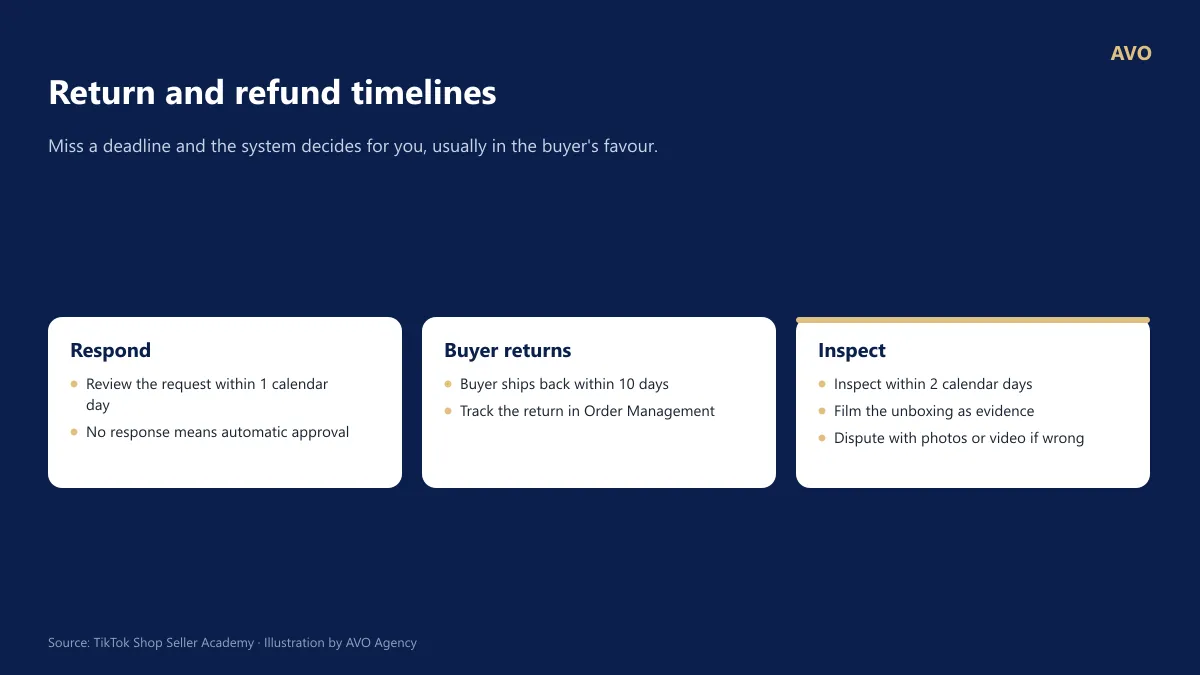
Figure 13: Key timelines for handling returns and refunds on TikTok Shop.
Steps to follow:
- Go to Returns & Refunds to review the customer’s reason, photos, and videos.
- Choose a resolution:
- Approve: Use this if the error is on the shop’s side.
- Partial Refund: Send a proposal via chat using a “negotiation card.” This is ideal for minor issues where the customer still wants to keep the product.
- Reject: Use this only if you have clear evidence (packing videos, photos of the package, shipping weight, etc.).
- If a return is approved: The customer has 10 days to ship the item back. Monitor the return tracking number.
- When receiving returns: Always record an unboxing video. If the returned item is incorrect, missing, or damaged by the customer, file an appeal with your evidence.
- Efficiency tip: For low-value orders, set up automation rules for cancellations and “Refund Only” (refund without return) requests to save time and processing effort.
AVO’s take: For low-value items, the cost of two-way shipping combined with processing time often exceeds the value of the product itself. In these cases, offering a partial refund or a “Refund Only” option is usually more cost-effective for your business.
Source: TikTok Shop Seller Academy – Managing Return and Refund Requests; TikTok Shop Seller Academy – Return and Refund Methods
16. What do I do about failed deliveries or refused parcels (“bom hàng”)?
Short answer: Failed TikTok Shop deliveries are grouped in the Failed delivery tab of Order Management. Once the parcel is returned to your shop, the order is cancelled automatically and the buyer is refunded. If the returned parcel is lost, damaged or destroyed, follow the cancellation and compensation guide, or file a logistics claim.
| Status / issue | What the shop should do |
|---|---|
| Label printing failed | Follow the guide to reprint the label |
| Pickup failed | Contact the carrier; you can appeal if it is counted as a late dispatch |
| Delivery to buyer failed | Contact the buyer or the carrier |
| Returning to seller | Track it; open the Help Centre if you need support |
| Returned to seller | Inspect the returned goods; the order cancels and refunds automatically |
| Return to seller failed (red alert) | Open the Help Centre and handle it immediately |
| Parcel lost / damaged / destroyed | Follow the cancellation and compensation guide |
Cutting down refused parcels at the source
- Confirm high-value orders through in-app chat as soon as the buyer places them.
- State size, colour and expected delivery time clearly so buyers do not change their mind midway.
- Use the Shipping and delivery issues quick filter to review problem orders from the last 7 days, every day.
- File logistics claims in the Seller Center; the platform aims to respond within 24 hours, though complex cases can take longer.
Source: Seller Academy – Managing failed deliveries (23/07/2026); How to file logistics claims.
17. Is it mandatory to reply to customer messages? What if I am away?
Short answer: Yes. TikTok Shop tracks your 12-hour and 24-hour response rates as well as your satisfaction rate. These metrics directly impact your store rating. Chat sessions left unanswered for more than 7 days will automatically close. If your shop does not have a dedicated customer service team, you should check messages daily. For long absences, enable Holiday Mode.
- 12-hour Response Rate: Percentage of customer-initiated sessions replied to within 12 hours.
- 24-hour Response Rate: The platform focuses heavily on this metric (calculated based on the last 7 days).
- Satisfaction Rate (4–5 stars): The percentage of chat sessions where customers provide a 4 or 5-star rating.
Recommended Setup
- Set up Auto-Replies and FAQs: Use chat tools to automate responses for common questions like sizing, delivery times, and return policies.
- Enable Seller Assistant (AI): If this feature is available on your account, turn it on to provide 24/7 support.
- Manage CS Staff: If you have employees, assign sub-account permissions. Set high session limits per agent (minimum 200 recommended) to ensure all incoming customers are assigned to a representative.
- Avoid Timeouts: Sessions unanswered for more than 7 days will expire, move to history, and cannot be replied to further. Always respond as soon as possible.
Holiday Mode (Inactivity Mode)
- Path: Profile › Account Settings › Inactivity Mode.
- When enabled: Customers cannot place new orders, auto-replies will be sent based on your custom message, and overall shop traffic will decrease.
- Existing orders: Holiday Mode does not apply to orders already placed. You must still ship those on time and handle any related after-sales requests.
Source: Seller Academy – Store Chat Performance; Chat Features for Customer Service; Holiday Mode.
Section 5. Shop Health and Compliance
18. Which metrics get a TikTok shop penalised or shown less?
Short answer: Three operating metrics trip up new sellers most often: keep the late dispatch rate at 4% or below, the seller-fault cancellation rate at 2.5% or below, and watch negative reviews. A product with more than 40 reviews in 60 days where over 10% are 1–2 stars gets put under enforcement. Track all of this under Account Health.
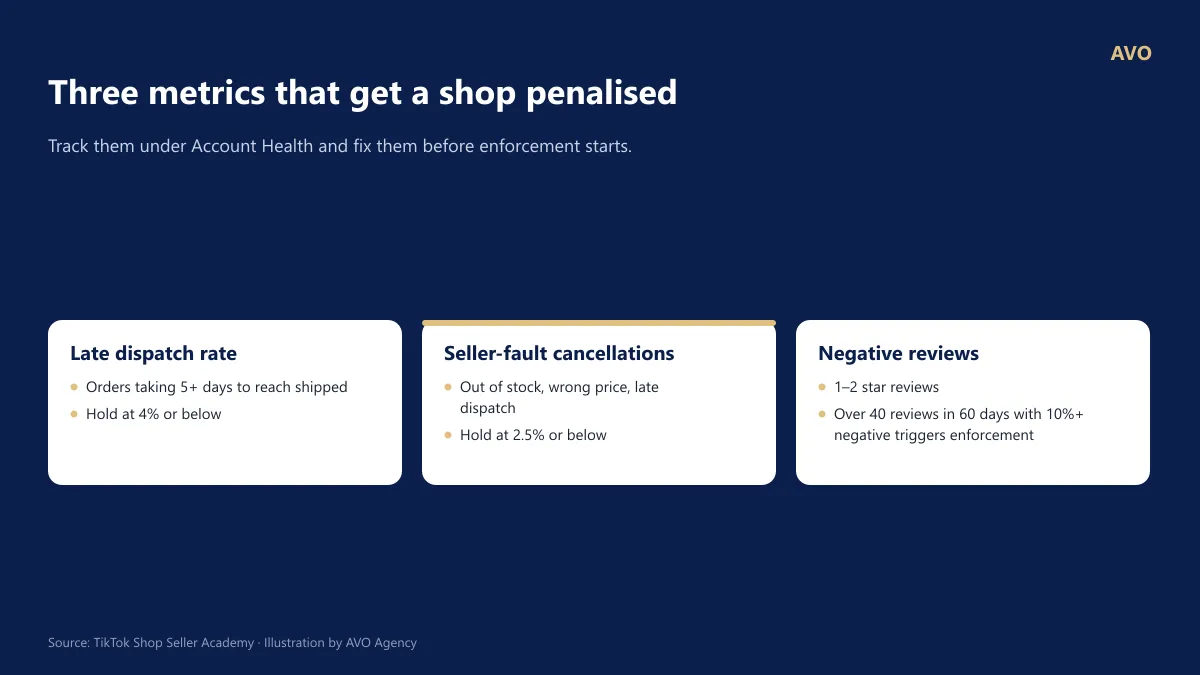
Figure 12: The thresholds TikTok Shop recommends sellers hold for the three operating metrics.
| Metric | How it is calculated | Threshold to hold |
|---|---|---|
| Late dispatch rate | Orders that take 5 days or more from order time to reach “shipped” | ≤ 4% |
| Seller-fault cancellation rate | Orders cancelled for being out of stock, wrongly priced or dispatched late, or cancelled by the system, measured over the last 15–45 days | ≤ 2.5% |
| Negative reviews | 1–2 star reviews | A product with more than 40 reviews in 60 days where over 10% are negative gets put under enforcement |
Where to track it: Account Health > Shop Health. The page shows your risk level, the current value against the target for each metric, violation points and the list of problem orders.
How to stay clear:
- Only sell what is physically in stock, and update stock daily.
- Check prices before switching on a promotion or joining a campaign.
- Process orders every day, weekends included.
- For a long break, turn on Holiday Mode. Note that it does not apply to orders already placed before the break.
Source: TikTok Shop Seller Academy – Business strategy guide for Mall sellers (operating metrics); TikTok Shop Seller Academy – Shop Health
19. What are violation points, and when does a shop get closed?
Short answer: TikTok Shop violation points are added every time a shop breaks a policy (counterfeit goods, wrong listings, late dispatch, pulling buyers off the platform, and so on). The more points accumulate, the more privileges you lose: at 36 points a shop can no longer create Flash Sales, and according to unofficial compilations, 48 points can lead to permanent shop closure. Track this under Account Health.
How to check and handle it
- Go to Account Health › Shop Health: check your risk level and the types of violation, then click each type to see the list of violation tickets.
- The Shop performance section shows each metric (order fulfilment, service, policy compliance, risk control): current value, target, assessment period and the matching violation points.
- Penalised wrongly: file an appeal with evidence within the allowed window, as soon as you receive the notice.
- If your shop runs affiliate marketing, watch the TikTok Account Health of your affiliate creators too and help them appeal.
⚠️ Violations new shops hit most often: selling branded goods without authorisation, clickbait images or titles, leaving phone numbers or off-platform links, cancelling orders for being out of stock, and repeated late dispatch.
Source: Seller Academy – Shop Health; TikTok Account Health; (17/03/2026) (requires violation points below 36). The 12/24/36/48 point scale is taken from VIRA (unofficial source).
20. Which numbers should I check every day as a TikTok Shop seller?
Short answer: Open Compass every day and read five metrics: GMV (the total value of goods buyers have paid for), product page views, conversion rate, traffic sources, and the cancellation and refund rate. Judge them over a 7-day window, because TikTok can credit an order to a video the buyer watched in the previous 7 days.
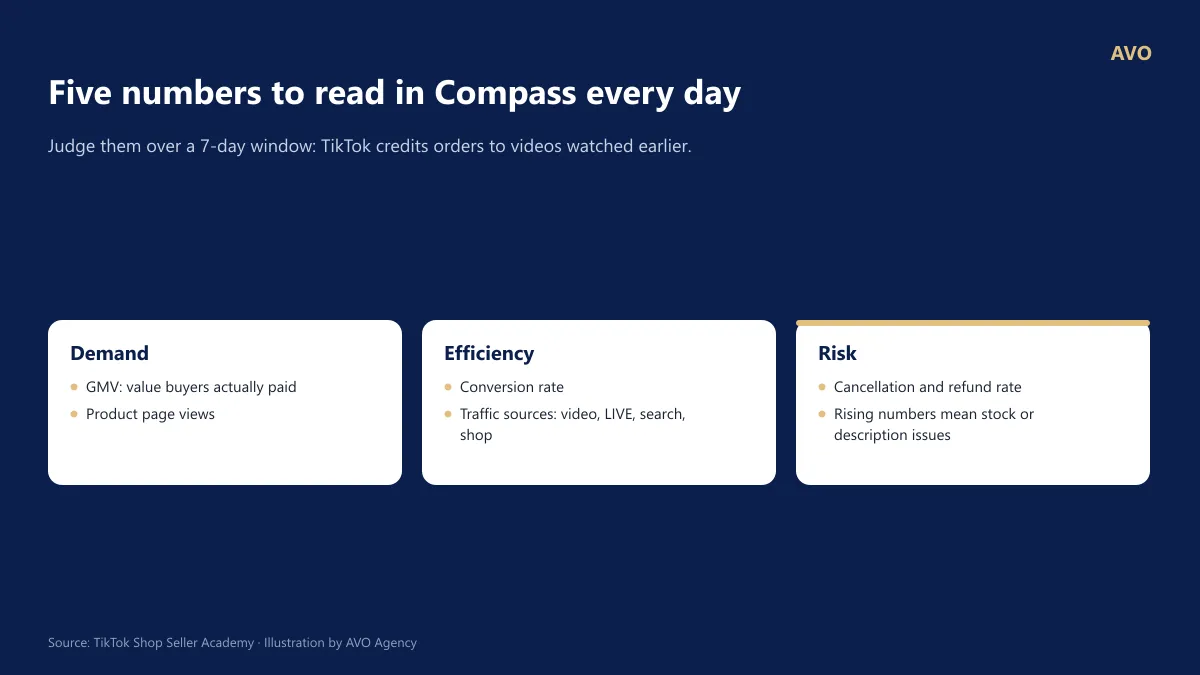
Figure 14: The 5 metrics to track daily in TikTok Shop Compass.
How to read them and decide:
| Symptom | Usual cause | Do this now |
|---|---|---|
| Few product page views | Not enough content pulling buyers in | Post more videos, join platform campaigns |
| Plenty of views but few orders | Price, images or reviews are not convincing | Run Price Diagnosis, fix the first image, add a voucher |
| Today’s GMV is higher than what today’s videos add up to | Orders credited to videos the buyer watched in the previous 7 days | Normal; judge performance weekly |
| Cancellations and refunds rising | Wrong stock levels, description does not match reality | Review stock levels and product descriptions |
AVO’s take: New sellers judge a video day by day. Read it over a 7-day window instead, to match how TikTok credits orders.
Source: TikTok Shop Seller Academy – Shop analytics in Compass
Section 6. Sales and Growth
21. Do I need 1,000 followers before I can sell?
Short answer: A shop owner does not need 1,000 followers to sell on TikTok Shop. The official account linked to your shop can sell your products with no follower requirement. The 1,000 followers and 18+ age threshold applies to affiliate creators, meaning people who sell on your behalf for a commission.
How this applies to you
- Shop owner making your own content: link one official account, post videos with product links and go LIVE from day one, without waiting for followers.
- Want more channels: after the new-shop period, link up to 4 additional marketing accounts (a review channel or a staff channel, for example).
- Want others to sell for you: open affiliate marketing, set a commission rate and invite eligible creators.
- An official account can only be unlinked 48 hours after linking, and only 3 times in total, so choose the account carefully at the start.
Source: Seller Academy – Official TikTok Shop account; Marketing accounts; Becoming a TikTok Shop creator – requirements.
22. How do I sell on TikTok Shop with no followers?
Short answer: You can sell with no followers, because videos are recommended on content, not just follower count. Start with short videos carrying a shopping cart (1–2 a day) and affiliate marketing with KOCs, then move to LIVE once you have a host and a steady schedule. Your shop page and platform campaigns add search traffic on top.
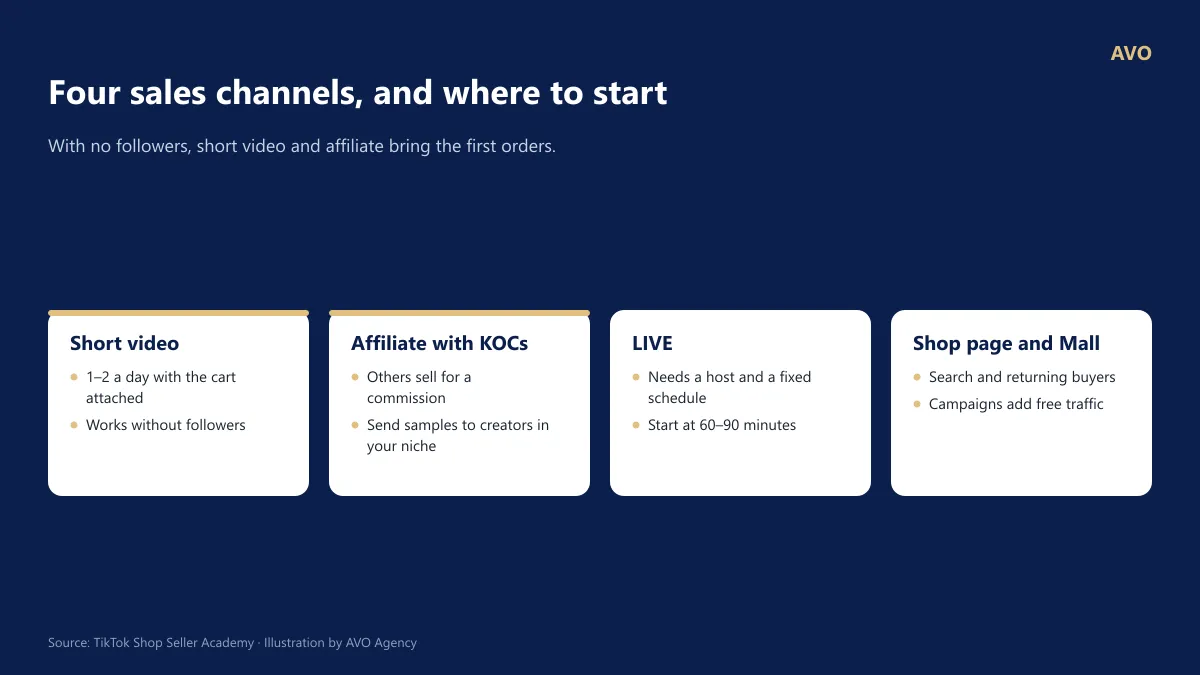
Figure 15: The 4 sales channels on TikTok Shop; the two with gold borders suit sellers who have no followers yet.
Suggested first 30 days (AVO’s take):
- Weeks 1–2: 1–2 videos a day of the real product (unboxing, trying it out, before and after). Attach the shopping cart to every video.
- Weeks 2–3: open affiliate marketing, invite 10–20 KOCs in your niche and send samples (see question 24).
- Weeks 3–4: pick the videos and products that produce orders and consider running GMV Max (see questions 26–28). Start short LIVEs (60–90 minutes) at the same time slot.
- In parallel: apply for suitable platform campaigns for extra free traffic.
TikTok recommends videos on content, not only on follower count. That makes the first 3 seconds and posting consistently matter more than your follower number.
Source: TikTok Shop Seller Academy – Shoppable video; TikTok Shop Seller Academy – Business strategy guide for Mall sellers
23. My new shop has no orders yet. Where do I start?
Short answer: Start with 3–5 hero products, post short videos with product links every day, and switch on a new-customer voucher, then expand into LIVE and affiliate creators. TikTok Shop sells through content, so video and LIVE are the main source of orders for a new shop.
The first 30 days (AVO’s suggestion)
- Week 1: finish 3–5 hero listings using the checklist in question 10; create a low-threshold new-customer voucher; design your shop page.
- Week 2: post 1–3 videos a day with product links, testing different angles: trying the product, before and after, solving the buyer’s problem. Note which videos get high product clicks.
- Week 3: open affiliate marketing and send samples to creators in your niche; try a short LIVE with a product that already has a good video.
- Week 4: apply for platform product campaigns (Promotions › Campaigns); read Compass to keep the channels that work.
⚠️ A common mistake: listing far too many products with only one video each, or running ads before any content has converted. Ads amplify what already works; they cannot rescue a product nobody wants yet.
Source: Seller Academy – TikTok Shop seller roadmap; Shoppable video; Product campaigns. The 30-day plan is AVO’s suggestion based on hands-on experience, not a TikTok Shop rule.
24. How do I start affiliate marketing with KOCs on TikTok Shop?
Short answer: Pick 3–5 products with enough margin to pay a commission, create an open affiliate plan and a targeted plan, invite KOCs in your niche and send free samples through the Seller Center. Then track which videos produce orders and request authorisation for the good ones so you can run them in GMV Max.
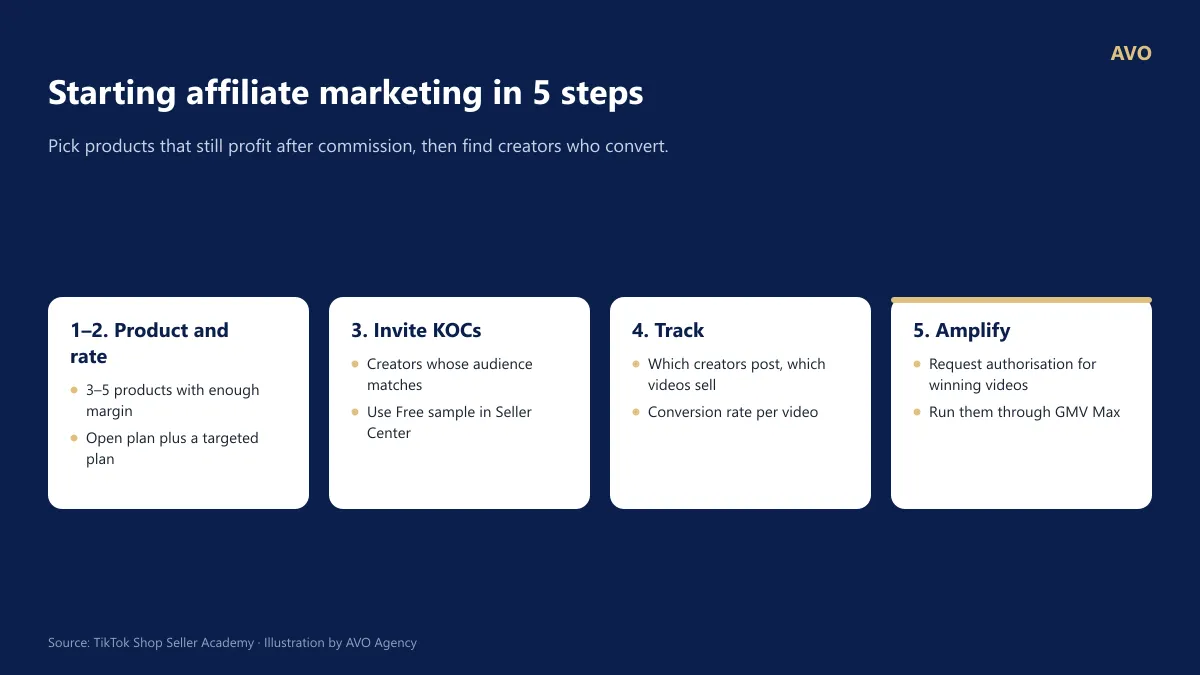
Figure 16: The 5-step route to starting affiliate marketing on TikTok Shop.
The steps:
- Pick products: 3–5 products that still make a profit after fees, KOC commission and sample costs (use the calculation in question 8).
- Set commission: create an open affiliate plan (any creator can sell) and a targeted plan (a separate rate for the KOCs you choose).
- Invite KOCs: find creators whose audience matches your product, send invitations through the Seller Center and use Free sample.
- Track: record which KOCs produce videos, which videos produce orders, and at what conversion rate.
- Amplify: good affiliate videos can be authorised for use in GMV Max.
You can also watch your affiliate creators’ violation records under Account Health > TikTok Shop Account Health.
AVO’s take: Do not send samples indiscriminately. Favour KOCs whose recent shopping videos produced real orders, not just a large follower count. Once affiliate accounts for most of your revenue, watch total commission plus ad spend closely, because margin erodes fast.
Source: TikTok Shop Seller Academy – Seller-initiated affiliate campaigns; TikTok Shop Seller Academy – How to send free samples
25. Which promotions should beginners start with?
Short answer: New TikTok Shop sellers should start with three core promotional tools: New Customer Vouchers (to drive the first order), Product Discounts, and Shop Flash Sales (to create urgency). Once you have a steady stream of orders, add tools to increase Average Order Value (AOV): Buy More Save More, Free Gift with Purchase, and Bundle Deals.
| Objective | Tool | Recommended Setup |
|---|---|---|
| Get first orders | New Customer Voucher | Set a low or no minimum spend threshold; run for a long duration. |
| Increase conversion rate | Product Discount, Shop Flash Sale | Use Flash Sales for the countdown timer effect; only available if violation points are below 36 and store rating meets minimum requirements. |
| Increase order value (AOV) | Buy More Save More (BMSM) | Use a maximum of 2 tiers (e.g., Buy 2 get 10% off, Buy 3 get 15% off). |
| Maintain list price | Free Gift with Purchase | Use this when the brand policy does not allow direct price discounting. |
| Close deals on LIVE | LIVE Interaction Voucher | Limit to 1 per customer if linked to a “Follow” task. |
Discount Stacking Rules to Remember
- New Customer Vouchers stack with Product Discounts, Flash Sales, and other shop discounts, but cannot be used with other shop vouchers (Regular Vouchers or LIVE Vouchers).
- Buy More Save More (BMSM) stacks with Campaign Prices, Product Discounts, Shop Flash Sales, and Seller Vouchers.
- Shop-funded discounts typically range from 1–50% depending on the tool; always check the specific limits when creating a promotion.
⚠️ Calculate profit and loss before hitting “Create”: Promotions stacked with platform fees (see Question 9) can push your actual payout below the product cost. Always calculate for the “worst-case scenario” where a customer applies every eligible discount simultaneously.
Mega Sales Preparation (Double Days: 9.9, 10.10, 11.11, 12.12)
Source: Seller Academy – New Customer Voucher; Shop Flash Sale; Buy More Save More; Free Gift with Purchase; Seller-Funded Discount Levels; Mega Sales Planning.
Section 7. GMV Max Advertising
26. What is GMV Max, and when should you run TikTok Shop ads?
Short answer: GMV Max is TikTok Shop’s automated ad solution that optimizes for total revenue (GMV) based on the seller’s target ROI. It comes in two formats: Product GMV Max promotes products through short videos and product detail pages, while LIVE GMV Max delivers impressions exclusively during active LIVE sessions. You should only start running ads once a product has organic traction, at least 10 creative videos, and a clearly calculated break-even ROI.
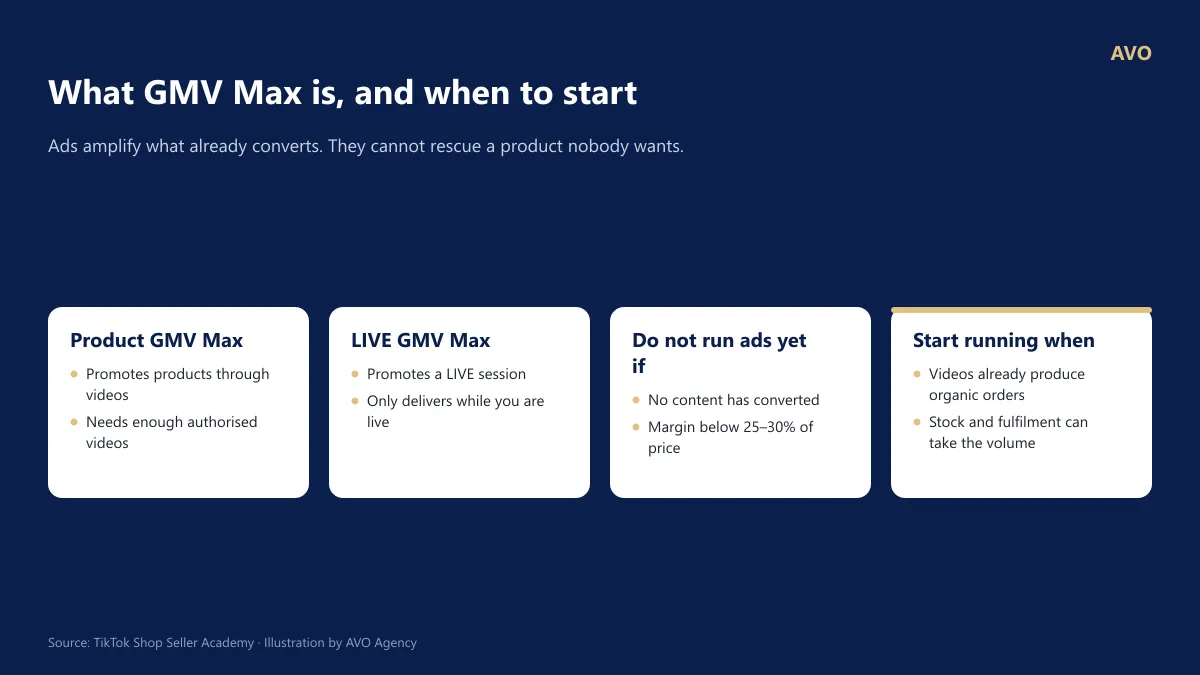
Figure 18: The two GMV Max formats and prerequisites to start running TikTok Shop ads.
| Product GMV Max | LIVE GMV Max | |
|---|---|---|
| Promotes | Products, via videos and product detail pages | LIVE room |
| Delivery window | Continuous | Only during active LIVE streams |
| Best suited for | Video-driven shops | Stores with a consistent LIVE schedule and skilled hosts |
Structuring Product GMV Max campaigns by product tier (per TikTok guidelines):
- Best sellers (over 30 orders/day over the last 30 days): 1 product/campaign.
- Growth products (30 orders/day or fewer): 3–5 products/campaign.
- Long-tail products: 15–20+ products/campaign.
- Recommended setup: Run 3–5 campaigns in parallel, keeping each active for at least 3–5 days (ideally 2 weeks).
AVO’s take: Advertising simply amplifies your current baseline. If a product cannot sell organically or your store health metrics are poor, running ads will only accelerate your losses.
Source: Complete Guide to GMV Max – TikTok Shop Ads (TikTok, updated 07/2026)
27. What target ROI should you set for GMV Max on TikTok Shop to avoid losses?
Short answer: Your break-even ROI for GMV Max equals the retail price divided by your pre-ad gross profit. For instance, a product priced at 200.000đ with a pre-ad profit of 73.000đ has a break-even ROI of approximately 2,74; to secure a 10% net profit margin on revenue, set your target ROI around 3,77. TikTok recommends adjusting your target ROI no more than once per day and observing performance for at least 3 days before making further changes.
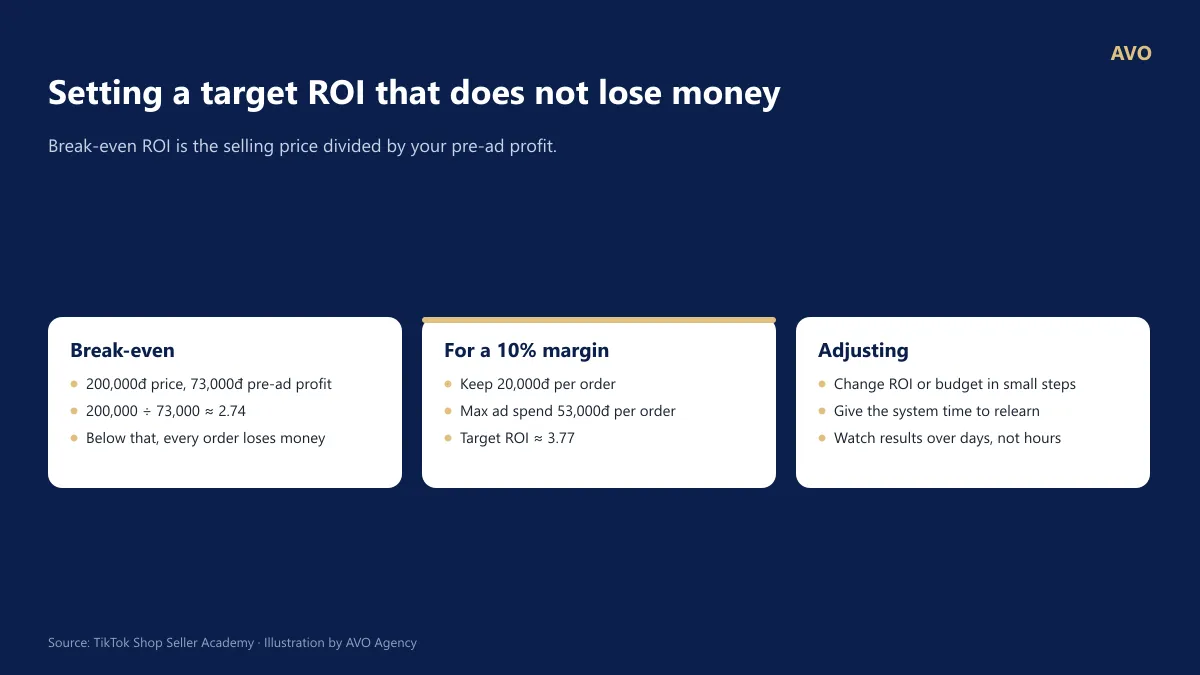
Figure 19: Break-even ROI calculation and rules for adjusting GMV Max ROI and budget.
Example (continuing from question 6): Retail price 200.000đ, pre-ad profit 73.000đ.
- Break-even ROI = 200.000 ÷ 73.000 ≈ 2,74. An actual ROI below this threshold means you are losing money.
- To maintain a 10% profit margin on revenue (20.000đ/order), your maximum ad spend is 53.000đ/order, which yields a target ROI = 200.000 ÷ 53.000 ≈ 3,77.
Adjustment rules per TikTok’s GMV Max guidelines:
| Scenario | Action |
|---|---|
| Regular days, budget spend < 50% | Lower target ROI by under 10% per adjustment |
| Regular days, budget spend ≥ 80% | Scale budget by approximately 30% per adjustment |
| Mega sale days | Lower target ROI to 0,8–0,9x; scale budget 2–3x |
| At all times | Do not adjust ROI more than once per day; observe for at least 3 days before adjusting again |
The budget will only spend fully when the campaign achieves approximately 80% or more of the target ROI. If your budget is underspending, the target ROI is typically set too high relative to the market performance of the product and creative assets.
AVO’s take: The ROI displayed on your ad dashboard is calculated based on gross GMV, before accounting for cancellations and returns. When calculating your break-even threshold, always factor in a safety buffer equal to your store’s actual cancellation and return rate.
Source: Complete Guide to GMV Max – TikTok Shop Ads (TikTok, updated 07/2026); Break-even ROI formula: AVO Agency
28. How many videos are needed to run GMV Max on TikTok Shop, and why do videos stop delivering?
Short answer: According to TikTok’s GMV Max guidelines, each campaign requires a minimum of 10 videos and at least 1 new video added daily; spending over 200 USD/day requires 15+ videos, and over 1,500 USD/day requires 80+ videos. New videos need approximately 3 days or 1,000 paid impressions for system exploration, so do not turn them off prematurely. KOC videos must be authorized to deliver.
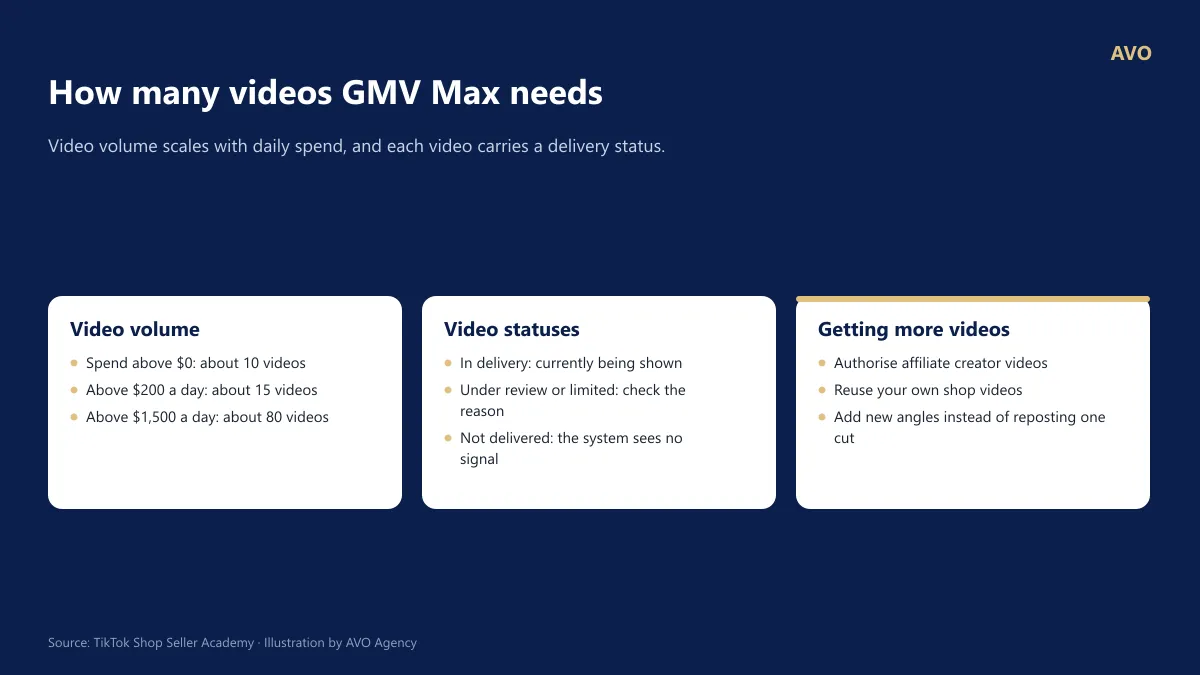
Figure 20: Recommended video volume for GMV Max and the meaning of video statuses.
Recommended video count by spend level (TikTok’s GMV Max guidelines):
| Daily Spend | Videos/Campaign | New Videos/Day |
|---|---|---|
| Over 0 USD | 10+ | 1+ |
| Over 200 USD | 15+ | 3+ |
| Over 1,500 USD | 80+ | 9+ |
Understanding video statuses:
- Exploring: Video is under 3 days old or has fewer than 1,000 paid impressions. Keep it running.
- Authorization needed: Video from a KOC or another account lacks authorization. Request an authorization code; status updates in about 20 minutes.
- Low performance: Both spend and GMV have been 0 over the last 7 days. It is better to produce new videos rather than wait.
How to quickly scale your video volume: Leverage videos from official and marketing accounts, request authorization codes for affiliate KOC videos, enter video codes (up to 20 codes at a time), and utilize video creation tools within Seller Center.
AVO’s take: For most small shops, creative output is the bottleneck, not budget. Before scaling your ad spend, make sure you are releasing new videos every day.
*Source: The Complete Guide to GMV Max – TikTok Shop Ads (TikTok, updated 07/2026)
Common TikTok Shop Terminology
- Seller Center: The administrative dashboard for TikTok Shop sellers used to list products, process orders, and review financials and performance metrics.
- GMV (Gross Merchandise Value): Total value of merchandise paid by customers, before deducting cancellations, returns, and platform fees.
- Settlement: The process where TikTok Shop transfers funds from completed orders—net of platform fees and taxes—into the seller’s account balance.
- Official Account: The primary TikTok account representing the shop; each shop can only link 1 official account.
- Marketing Account: A secondary linked TikTok account used to promote and sell the shop’s products; up to 4 accounts allowed.
- Affiliate: A performance-marketing model where content creators (KOCs, KOLs) promote a shop’s products and earn commissions on successful orders.
- GMV Max: An automated TikTok Shop ad solution optimized for total revenue based on seller-defined target ROI, comprising Product GMV Max and LIVE GMV Max.
- ROI (in GMV Max): Total GMV divided by ad spend. An ROI of 3 means 1 unit of ad spend generates 3 units of revenue.
- Breakeven ROI: The ROI threshold where profit equals zero, calculated by dividing the selling price by the pre-ad profit margin.
About AVO Agency
AVO Agency specializes in TikTok Shop Ads and GMV Max operations for Vietnamese sellers. All insights are benchmarked against official TikTok Shop documentation; sections marked “AVO’s take” reflect our team’s hands-on operational experience.
Reference sources
- TikTok Shop Seller Academy Vietnam – Seller account registration process (12/06/2026)
- TikTok Shop Seller Academy – Shop ownership change process (09/07/2026)
- TikTok Shop Seller Academy – Official TikTok Shop account
- TikTok Shop Seller Academy – New shop adjustment period
- TikTok Shop Seller Academy – Platform commission fee (01/07/2026) and Order processing fee
- TikTok Shop Seller Academy – Tax withholding for individual and household business sellers (03/04/2026)
- TikTok Shop Seller Academy – How to withdraw funds from your balance
- TikTok Shop Seller Academy – Complete guide to Platform Shipping (16/07/2026)
- TikTok Shop Seller Academy – Shop Health
- TikTok Shop Seller Academy – Managing return and refund requests
- TikTok Shop Seller Academy – How stacked promotions are calculated
- Báo Công Thương – From 9/5, TikTok Shop raises its seller fee schedule again
- TikTok – Complete GMV Max guide – TikTok Shop Ads (official partner documentation, updated 07/2026)
This article is for reference only and does not replace legal or tax advice. TikTok Shop policies change; check the current figures in your Seller Center before acting on them.
Stuck on something that is not on this list?
Call or message AVO on Zalo and you reach the person in charge. This website collects no information about you.